" height="12.257748118179375px" id="wrsfIsVFc" transform="translate(0 1.5)" width="23.75015898699037px"/><path d="M 4.912 14.648 L 0 14.648 L 0 0.098 L 5.02 0.098 C 9.346 0.098 12.031 2.881 12.031 7.354 C 12.031 11.855 9.365 14.648 4.912 14.648 Z M 2.578 12.441 L 4.776 12.441 C 7.939 12.441 9.424 10.586 9.424 7.354 C 9.424 4.15 7.92 2.304 4.854 2.304 L 2.578 2.304 Z M 17.5 14.854 C 15.342 14.854 13.828 13.428 13.828 10.781 L 13.828 4.336 L 16.289 4.336 L 16.289 10.391 C 16.289 11.904 17.051 12.695 18.369 12.695 C 19.668 12.695 20.625 11.924 20.625 10.166 L 20.625 4.336 L 23.095 4.336 L 23.095 14.648 L 20.674 14.648 L 20.674 13.066 C 19.971 14.228 18.926 14.853 17.5 14.853 Z M 28.438 14.815 C 26.387 14.815 24.873 13.779 24.873 11.719 C 24.873 9.375 26.797 8.799 28.926 8.574 C 30.84 8.359 31.494 8.33 31.494 7.627 L 31.494 7.549 C 31.494 6.669 30.791 6.045 29.609 6.045 C 28.409 6.045 27.607 6.67 27.539 7.539 L 25.166 7.539 C 25.283 5.489 26.963 4.131 29.658 4.131 C 32.344 4.131 33.936 5.469 33.936 7.617 L 33.936 14.648 L 31.514 14.648 L 31.514 13.193 L 31.474 13.193 C 30.986 14.111 30.117 14.815 28.438 14.815 Z M 29.043 12.988 C 30.654 12.988 31.504 12.031 31.504 10.83 L 31.504 9.717 C 31.201 9.912 30.244 10.068 29.229 10.225 C 28.174 10.381 27.276 10.762 27.276 11.699 C 27.276 12.509 27.969 12.989 29.043 12.989 Z M 38.574 0.098 L 38.574 14.648 L 36.114 14.648 L 36.114 0.098 Z M 40.762 14.648 L 40.762 4.336 L 43.222 4.336 L 43.222 14.648 Z M 41.992 2.803 C 41.152 2.803 40.518 2.197 40.518 1.396 C 40.518 0.606 41.152 0 41.992 0 C 42.832 0 43.467 0.605 43.467 1.396 C 43.467 2.197 42.832 2.803 41.992 2.803 Z M 51.006 4.336 L 51.006 6.318 L 48.906 6.318 L 48.906 11.69 C 48.906 12.422 49.151 12.666 49.951 12.666 L 51.006 12.666 L 51.006 14.648 L 49.522 14.648 C 47.422 14.648 46.436 13.818 46.436 12.051 L 46.436 6.318 L 44.639 6.318 L 44.639 4.336 L 46.436 4.336 L 46.436 1.523 L 48.906 1.523 L 48.906 4.336 Z M 56.953 14.883 C 53.857 14.883 51.923 12.627 51.923 9.502 C 51.923 6.367 53.965 4.102 56.855 4.102 C 59.825 4.102 61.797 6.299 61.797 9.462 L 61.797 10.137 L 54.336 10.137 C 54.395 11.817 55.352 12.94 57.012 12.94 C 58.252 12.94 59.082 12.344 59.365 11.465 L 61.67 11.465 C 61.28 13.486 59.365 14.883 56.953 14.883 Z M 54.356 8.438 L 59.435 8.438 C 59.278 6.963 58.321 6.055 56.895 6.055 C 55.47 6.055 54.522 6.963 54.356 8.438 Z" fill="rgb(3, 16, 31)" height="14.883000236511231px" id="F4i2eOlQG" transform="translate(33 0)" width="61.79700033569337px"/></g></svg>)

Return to All Blogs
Best AI Models for Coding (2026): Top Tools and LLMs for Developers
The AI coding landscape changed completely in 2026. Here are the models and tools actually worth using today, with real benchmarks and honest comparisons.
0 mins read
The Short Answer
The best AI models for coding in 2026 are Claude Opus 4, GPT-4o, Gemini 2.5 Pro, DeepSeek V3, and Qwen3-72B — each strong in different areas like agentic coding, speed, open-source flexibility, and multilingual support. According to the SWE-bench Verified leaderboard (June 2026), Claude Opus 4 leads on real-world software engineering tasks with a 72.5% solve rate. That said, the model you pick matters less than the workflow around it. Developers who skip model-wrangling entirely and use AI app builders like Dualite ship complete products faster than those manually prompting raw APIs.
Why This List Changed Completely from 2025
If you read a "best AI models for coding" list from late 2025, most of it is already outdated. Here is what changed:
Claude 3.5 Sonnet, which topped most 2025 lists, has been superseded by Claude Opus 4 and Claude Sonnet 4 with significantly higher benchmark scores. GPT-4o is still relevant but no longer the default "best all-around" pick. Gemini 2.5 Pro went from a speed-focused model to a genuine top-tier coding model. DeepSeek V3 became a serious open-source contender — trained for a fraction of the cost of frontier models but scoring competitively. And the entire category of "AI coding tools" restructured around agents, not just autocomplete.
This guide reflects where things actually stand in mid-2026, not where they were nine months ago.
Top 5 AI Models for Coding in 2026
AI Model | Best For | SWE-bench Score | Context Window |
|---|---|---|---|
Claude Opus 4 (Anthropic) | Agentic coding, complex systems | 72.5% | 200k tokens |
GPT-4o (OpenAI) | Multi-language, rapid prototyping | 49% | 128k tokens |
Gemini 2.5 Pro (Google) | Long context, algorithmic tasks | 63.2% | 1M tokens |
DeepSeek V3 (DeepSeek) | Open-source, cost efficiency | 49.6% | 128k tokens |
Qwen3-72B (Alibaba) | Instruction following, multilingual | 45.1% | 128k tokens |
Source: SWE-bench Verified leaderboard and official model documentation, June 2026
1. Claude Opus 4 (Anthropic)
Overview: Claude Opus 4 is Anthropic's frontier model and currently leads the SWE-bench Verified benchmark with a 72.5% solve rate. It was designed from the ground up for agentic tasks — meaning it can plan, execute, and course-correct across long coding sessions without losing context.
Where Claude 3.5 Sonnet was good at code generation, Opus 4 is good at software engineering — a meaningful difference. It handles multi-file refactors, architecture decisions, test generation, and debugging across large codebases better than any other model available today.
Key strengths:
Highest SWE-bench score of any available model (72.5% as of June 2026)
200k token context handles entire codebases in one session
Strong at following multi-step agentic instructions without drifting
Best-in-class for code that needs to be production-safe, not just functional
Best for: Senior developers and engineering teams working on complex systems, large refactors, or agentic coding pipelines. Also powers Claude Code, Anthropic's CLI coding agent.
2. GPT-4o (OpenAI)
Overview: OpenAI's GPT-4o remains a reliable workhorse. It scores 49% on SWE-bench Verified — lower than Claude Opus 4 or Gemini 2.5 Pro — but its strength is breadth. It handles over 50 programming languages fluently, generates clean boilerplate fast, and integrates with more third-party tools than any other model.
For developers who live inside ChatGPT or need a model that "just works" across many different tasks without fine-tuning, GPT-4o still makes sense. It is also the backbone of GitHub Copilot's chat features.
Key strengths:
Widest ecosystem integration of any model
Reliable and consistent across many languages and frameworks
Strong at prototyping, documentation generation, and explaining existing code
Multimodal — can read screenshots, diagrams, and wireframes alongside code
Best for: Developers who want a versatile, well-supported model that works across their entire stack, not just one language or use case.
3. Gemini 2.5 Pro (Google DeepMind)
Overview: Gemini 2.5 Pro surprised many developers in 2026 by reaching a 63.2% score on SWE-bench Verified — a significant jump from earlier Gemini versions. Its 1 million token context window is the largest of any model on this list and makes it genuinely useful for tasks like analyzing entire repositories, generating tests for large codebases, or refactoring legacy systems.
Speed is another advantage. Benchmarks from Artificial Analysis show Gemini 2.5 Flash (the lighter variant) hitting over 279 tokens per second — useful when you need fast iteration loops.
Key strengths:
1 million token context window — handles entire repos in a single prompt
Strong performance on algorithmic and mathematical code problems
Fast inference speed on the Flash variant
Deep integration with Google's developer tools and Vertex AI
Best for: Data scientists, ML engineers, and backend developers working with large codebases, complex algorithms, or data-heavy applications.
4. DeepSeek V3 (DeepSeek)
Overview: DeepSeek V3 is the open-source story of 2026. Trained at a fraction of the cost of frontier models and scoring 49.6% on SWE-bench Verified, it punches well above its weight. The fact that it is fully open-weight means you can run it locally, fine-tune it for your stack, or deploy it on your own infrastructure with no API costs.
For teams with sensitive codebases, compliance requirements, or simply wanting to avoid per-token costs at scale, DeepSeek V3 is the most compelling option available.
Key strengths:
Fully open-source and self-hostable — zero API costs at scale
Supports 338 programming languages
Strong at debugging, error fixing, and code optimization
Active community producing fine-tuned variants for specific use cases
Best for: Teams needing privacy, cost control, or the ability to fine-tune a model for internal codebases and standards.
5. Qwen3-72B (Alibaba Cloud)
Overview: Alibaba's Qwen3-72B is the strongest open-weight model for instruction-following coding tasks. Its "thinking mode" — where the model reasons step by step before responding — makes it particularly good at complex coding instructions that require careful interpretation.
With support for 29+ languages and a 128k token context, it is also the best option for multilingual development teams working across different regional codebases.
Key strengths:
Thinking mode enables careful step-by-step reasoning on complex tasks
Best multilingual support of any model on this list (29+ languages)
Can be fine-tuned for specific company coding standards
Strong on instruction-based tasks: "build this exactly as specified"
Best for: Teams with multilingual codebases, developers who work from detailed specifications, and anyone who needs a model that can be fine-tuned and self-hosted.
Top 5 AI Coding Tools in 2026
Tool | Type | Best For | Pricing |
|---|---|---|---|
Dualite | AI app builder | Building full apps without writing code | Free to $79/mo |
Cursor | AI code editor | Augmenting existing development workflow | Free to $40/mo |
Claude Code | CLI coding agent | Agentic tasks, complex engineering | Usage-based |
Windsurf | AI code editor | Fast autocomplete, team workflows | Free to $15/mo |
GitHub Copilot | IDE assistant | In-editor suggestions, PR reviews | $10 to $19/mo |
Source: Official pricing and documentation, June 2026
1. Dualite
Overview: Dualite sits in a different category from the other tools on this list. Where Cursor or Copilot augment existing coding workflows, Dualite replaces the coding step entirely for many use cases. You describe what you want to build in plain language and get a complete, working web or mobile app back — connected to a real database, with authentication, and deployable to a custom domain.
For the 100,000+ users across 150+ countries who have adopted it, the appeal is simple: they go from idea to shipped product in hours, not weeks. Developers use it for rapid prototyping and internal tools. Non-technical founders use it to build their first product without a technical co-founder.
Key strengths:
Describe an app in plain language, get working production code back
Figma-to-code: import designs and get a functional frontend
GitHub sync for developers who want to own the codebase
Supports web apps, mobile apps, dashboards, and AI-powered tools
No per-prompt credit limits on the Launch plan ($79/month)
Best for: Non-technical founders, designers building MVPs, developers who want to ship internal tools fast, and anyone who wants to spend less time writing boilerplate.
2. Cursor
Overview: Cursor is still the go-to AI code editor for developers who want to keep their existing workflow but make it significantly faster. Built as a VS Code fork, it adds multi-line autocomplete, an agent mode that can execute tasks end-to-end, and a codebase-aware chat interface.
The big upgrade in 2026 is improved agent reliability — earlier versions would often get stuck in loops. The current release handles multi-step tasks more cleanly and lets you switch between Claude Opus 4 and GPT-4o depending on the task.
Best for: Developers who want maximum productivity inside a familiar IDE without changing their existing stack.
3. Claude Code
Overview: Anthropic's Claude Code is a command-line tool that turns Claude Opus 4 into a full coding agent. You give it a task — "add authentication to this Express app" or "refactor this module to use TypeScript" — and it plans, executes, tests, and iterates until the task is done or it asks you for input.
It is the most powerful agentic coding tool available today for developers comfortable with a terminal. It reads your entire codebase, makes targeted changes across multiple files, and runs tests to verify its work.
Best for: Senior developers and engineering teams tackling complex, multi-file tasks who are comfortable with agentic, terminal-based workflows.
4. Windsurf (by Codeium)
Overview: Windsurf rebranded from Codeium and positioned itself as the Cursor alternative with a stronger focus on team collaboration and enterprise features. It supports 70+ languages, offers fast autocomplete, and has strong context-aware suggestions that understand your entire project structure.
For teams that found Cursor too heavyweight or wanted better enterprise security controls, Windsurf is worth evaluating.
Best for: Individual developers and enterprise teams who need fast, secure AI-assisted coding with good team workflow integration.
5. GitHub Copilot
Overview: GitHub Copilot has been around the longest and is the most widely adopted AI coding tool. In 2026 it added agent mode (Copilot Workspace) and integrated PR review capabilities. It still powers most developers' first experience with AI-assisted coding.
It is not the most powerful option on this list, but it is embedded inside GitHub — which means pull request summaries, code review suggestions, and inline autocomplete all work without switching tools.
Best for: Developers already living inside GitHub who want AI assistance without adopting a new tool.
AI Models for Coding: A Practical Comparison
To see how these models actually perform side by side on real coding tasks:
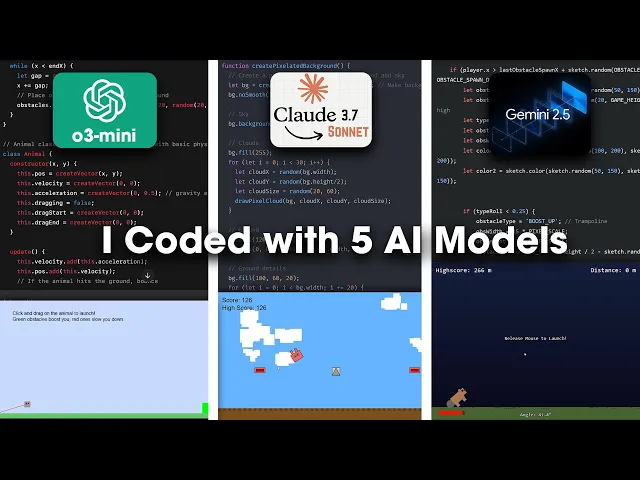
The honest answer is that benchmarks like SWE-bench tell you a lot about how models handle realistic software engineering tasks, but they do not tell you which tool fits your workflow. The best approach is to try two or three options on a real task from your current project — not a demo — and judge from there.
Conclusion
The best AI model for coding in 2026 depends on what you are actually trying to do. Claude Opus 4 leads on complex, agentic software engineering. Gemini 2.5 Pro is the pick for large context and algorithmic work. DeepSeek V3 is the open-source choice for teams with privacy or cost requirements. GPT-4o and Qwen3-72B are strong generalists with wide ecosystem support.
If you are spending most of your time writing boilerplate, scaffolding projects, or building internal tools, it is worth asking whether you need a coding model at all — or whether a tool like Dualite gets you to the same place faster.
Frequently Asked Questions
1. What is the best AI model for coding in 2026?
Claude Opus 4 currently leads the SWE-bench Verified benchmark with a 72.5% solve rate, making it the strongest model for complex, real-world software engineering tasks. For general-purpose coding across many languages, GPT-4o and Gemini 2.5 Pro are both excellent. For open-source and self-hosted setups, DeepSeek V3 is the top pick.
2. Is Claude better than GPT-4o for coding?
On agentic tasks and complex multi-file engineering, Claude Opus 4 outperforms GPT-4o significantly. Claude scores 72.5% on SWE-bench Verified versus GPT-4o at 49%. For simpler, single-file tasks or prototyping, GPT-4o is fast and reliable. The gap closes on everyday coding tasks and widens on enterprise-scale work.
3. What is SWE-bench and why does it matter?
SWE-bench Verified is a benchmark of real GitHub issues from popular open-source repositories. Models are scored on how often they can write code that actually fixes the issue and passes the test suite — no partial credit. It is the most realistic public benchmark for coding ability because it uses genuine software engineering problems, not textbook exercises.
4. Can I use these AI models for free?
Yes, with limits. GPT-4o is available free through ChatGPT with usage caps. Gemini 2.5 Pro has a free tier in Google AI Studio. DeepSeek V3 is fully open-source and free to run locally. Claude and Qwen3 have free tiers with message limits. For heavy use, paid plans ($20-40/month) remove most restrictions.
5. What is the difference between an AI model and an AI coding tool?
An AI model (Claude, GPT-4o, Gemini) is the underlying intelligence — the thing that understands and generates code. An AI coding tool (Cursor, Copilot, Dualite) is the interface that wraps a model and puts it into your workflow. Most tools let you choose which model powers them. Cursor, for example, lets you switch between Claude Opus 4 and GPT-4o depending on the task.
6. Which AI coding tool is best for beginners?
For complete beginners, Dualite is the lowest-friction option — describe what you want to build in plain language and get a working app back without writing code. For developers just starting with AI-assisted coding, GitHub Copilot integrates into existing editors with minimal setup. Cursor is better for experienced developers who want full control.
7. Is DeepSeek V3 actually good for coding?
Yes. DeepSeek V3 scores 49.6% on SWE-bench Verified — comparable to GPT-4o — and it is fully open-source. It supports 338 programming languages and is particularly strong at debugging and code optimization. The main trade-off is that running it locally requires significant hardware (the model has 236 billion parameters). For most teams, using it through an API is more practical.
8. How do AI coding tools handle security and privacy?
This varies significantly by tool. Cloud-based models (GPT-4o, Claude via API) send your code to provider servers for processing. Cursor and Copilot have enterprise modes with enhanced privacy controls. DeepSeek V3 and Qwen3-72B can be self-hosted, keeping code entirely on your infrastructure. Dualite is local-first by design — your code stays on your machine.
9. What AI model does GitHub Copilot use?
GitHub Copilot uses a mix of models depending on the feature. Inline autocomplete runs on OpenAI's Codex and GPT-4o family. Copilot Chat uses GPT-4o. Copilot Workspace (agent mode) also runs on GPT-4o. GitHub has announced plans to support additional models including Claude in some features.
10. Will AI replace software developers?
Not in the near future, but the job is changing. AI models now handle a growing share of boilerplate, debugging, and routine refactoring. What developers spend their time on is shifting toward architecture decisions, product thinking, and reviewing AI-generated code rather than writing all code from scratch. The developers who adapt to working with AI as a collaborator are significantly more productive than those who do not.
11. How do I choose between Claude Code and Cursor?
Claude Code is better for long, complex agentic tasks where you give a high-level instruction and let the model execute across many files. Cursor is better for interactive development where you want AI assistance while actively writing code. Many developers use both: Cursor for day-to-day coding, Claude Code for larger refactoring sessions or scaffolding new features.
12. What is the fastest AI model for code generation?
Gemini 2.5 Flash reaches over 279 tokens per second on Artificial Analysis benchmarks, making it the fastest option for raw code generation speed. For most developers, though, the bottleneck is not model speed but review and integration time. A slightly slower model that generates more accurate code often saves more time overall.
Related: AI Assisted Programming: A Complete Guide - Top 10 Best AI Coding Assistant Tools - Best Local LLM Tools (2026)