Return to All Blogs

What Is AI Code Review? A Complete Guide

Understand AI code review, its advantages, and how it helps improve code quality and reduce errors in software development.

0 mins read

AI code review uses machine-learning and generative AI tools to scan source code for bugs, security risks, performance bottlenecks, and style violations : delivering instant, consistent feedback inside the developer's workflow. Adopted alongside human reviewers, it cuts review time, standardizes quality across teams, and integrates directly into CI/CD pipelines.

This guide covers the process, benefits, top tools, platform integrations, and limitations of AI code review : so you can decide where it fits in your stack and how to get started without disrupting your existing workflow.

What Is AI Code Review?

AI code review uses artificial intelligence algorithms to analyze source code for potential issues. These tools automatically detect bugs, security vulnerabilities, performance bottlenecks, and deviations from coding standards. They provide instant feedback directly within the developer's workflow.

AI reviews code much faster than a human can. It operates with high efficiency and without the inherent biases that can affect manual reviews. This leads to more consistent and objective feedback, helping to standardize code quality across large teams. A proper AI code review process is a cornerstone of modern development.

Types of AI Used in Code Review

The technology behind these tools varies, but it generally falls into a few key categories.

  • Predictive code review: This refers to tools that use machine learning models trained on vast datasets of open-source code. They learn patterns of common errors and best practices to provide intelligent suggestions.

  • Code review with generative AI: This is a more advanced form. Generative AI models, like those powering GitHub Copilot or Claude AI, do not just find issues. They can also rewrite and suggest complete, production-ready code snippets to fix them.

  • Automated AI code review: This type focuses on seamless integration into the development pipeline. It automatically triggers reviews on new code commits or pull requests, providing continuous quality assurance without any manual intervention.

How AI Code Review Works

Understanding the mechanics of AI code review helps in appreciating its power. The process is systematic and data-driven.

The Process of AI Code Review

The workflow typically involves three key steps.

  1. Analysis: The AI tool scans the code. It parses the syntax and structure to understand its purpose and logic.

  2. Suggestion: Using its trained models, the AI identifies potential problems. It flags everything from simple style inconsistencies to complex security risks like SQL injection.

  3. Feedback: The tool presents its findings to the developer. This feedback often includes not only a description of the issue but also concrete suggestions for how to fix it, sometimes with code examples.

Role of Machine Learning and Natural Language Processing

Machine Learning (ML) is the engine behind AI code review. These systems train on millions of lines of code from public repositories. This massive dataset allows the AI to learn the nuances of different programming languages and identify what constitutes high-quality, secure code.

Natural Language Processing (NLP) also plays a crucial role. It helps the AI understand the comments and documentation within the code. This provides context, enabling the tool to make more relevant and accurate suggestions.

AI vs. Manual Code Review

Both AI-assisted and traditional human-led reviews have their place in a modern development workflow. Understanding their distinct advantages helps teams create a balanced and effective quality assurance strategy. The second use of the primary keyword, AI code review, emphasizes its role in this comparison.

Feature

AI-Assisted Code Review

Manual Code Review

Speed

Extremely fast. A review taking a developer hours can be done in minutes (e.g., reducing a 2-hour task to 15 minutes).

Slow; dependent on human availability and focus.

Accuracy

Highly accurate for known bugs and style issues.

Variable; depends on the reviewer's expertise.

Consistency

Perfectly consistent; applies the same rules every time.

Inconsistent; subject to human mood, bias, and fatigue.

Context

Limited understanding of business logic and intent.

Excellent at understanding business context and goals.

Scope

Best for security, performance, and style checks.

Best for architectural decisions and complex logic validation.

Scalability

Scales effortlessly across any number of projects.

Difficult to scale; requires more developers.

Top AI Code Review Tools

The market for AI code review tools is expanding rapidly. Here is a curated list of some of the top solutions available today, each with unique strengths.

  1. Dualite.dev: An AI coding tool that helps developers generate code & write code faster with fewer errors.

  2. Traycer: Focuses on debugging and error tracing in production environments.

  3. GitHub Copilot: Integrated directly into the GitHub ecosystem, it provides code suggestions and can now review pull requests, summarizing changes and flagging issues.

  4. CodeRabbitAI: Specializes in providing line-by-line suggestions on pull requests, acting like a virtual team member.

  5. PullSense: Analyzes developer activity in pull requests to provide metrics and insights for engineering managers.

  6. Codeant AI: A free tool that offers intelligent code completion and review features within the IDE.

  7. Sweep AI: An AI junior developer that helps fix small bugs and implement feature requests.

  8. CodePeer: An advanced static analysis tool for the Ada programming language, designed for high-integrity systems.

  9. PullRequest: Combines automated analysis with a network of on-demand human expert reviewers.

  10. Graphite Reviewer: An AI-powered tool that automates the creation and review of pull requests.

  11. Korbit AI: Provides AI-driven mentorship and feedback for developers, helping them learn best practices.

  12. Cody by Sourcegraph: Understands your entire codebase to answer questions and write code that matches your established style.

  13. Kody: An AI coding assistant focused on helping developers write code faster and with fewer errors.

  14. Claude AI Sonnet: A powerful generative AI model that can be used for sophisticated code analysis and generation tasks.

  15. CloudAEye: An observability platform that uses AI to detect and resolve issues in cloud-native applications.

  16. Sourcery: Refactors code instantly, helping to clean up and improve the quality of an existing codebase.

  17. Greptile: An AI tool that understands entire code repositories to provide context-aware assistance.

  18. Codacy: An automated code analysis platform that checks for quality, security, and style across more than 40 programming languages.

Features to Look for in AI Code Review Tools

When selecting a tool, you should consider several key features.

  • Accuracy: Does it find meaningful issues without too many false positives?

  • Speed: How quickly does it provide feedback on your codebase?

  • Integration: Does it connect with your essential tools like VS Code, GitHub, GitLab, and Bitbucket?

  • Security Features: Does it specialize in finding security flaws, like the OWASP Top 10?

  • Language Support: Does it support your team's main programming languages and frameworks?

Free AI Code Review Tools

Adopting new technology does not have to be expensive. Several powerful AI code review tools are available for free, making them accessible to individual developers and small teams.

Top Free AI Code Review Tools

Two excellent examples of free offerings are Codeant AI and Codacy.

  • Codeant AI: This tool integrates directly into your IDE. It provides smart code completions and on-the-fly analysis to catch errors before they are even committed.

  • Codacy: Codacy offers a free tier for open-source projects and small teams. It automates code reviews and monitors code quality over time, providing a dashboard with actionable insights.

Pros and Cons of Using Free Tools

Free tools provide a great entry point into the world of AI-assisted development.

Pros:

  • No Cost: You can start improving your code quality immediately without any financial investment.

  • Easy Adoption: They are typically simple to set up and start using.

  • Core Functionality: Most free tools offer the essential features needed for basic code scanning.

Cons:

  • Limited Features: Advanced features, such as enterprise-grade security scanning or detailed reporting, are often reserved for paid plans.

  • Usage Caps: There may be limits on the number of users, private repositories, or lines of code you can analyze.

  • Less Support: Customer support may be limited compared to paid tiers.

How to Get Started with Free Tools

Getting started is usually straightforward. Here is a general guide:

  1. Choose a Tool: Select a tool that supports your programming language and integrates with your version control system.

  2. Sign Up: Create a free account using your GitHub, GitLab, or Bitbucket credentials.

  3. Authorize Access: Grant the tool permission to access your repositories.

  4. Configure Analysis: The tool will typically analyze your default branch automatically. You can then configure it to run on every new pull request.

  5. Review Feedback: View the analysis results on the tool's dashboard or directly in your pull requests as comments.

Automated AI Code Review

Automated AI code review takes the concept a step further by removing the manual trigger from the process. It is about creating a system of continuous, unattended quality checks.

What is Automated AI Code Review?

Automated AI code review refers to systems that are configured to run without human intervention. These tools are integrated directly into a team's continuous integration and continuous delivery (CI/CD) pipeline. Every time a developer pushes new code, the AI review process is automatically initiated.

This ensures that every single line of code is checked against predefined quality and security standards before it can be merged. It acts as an unblinking, vigilant guardian of your codebase.

How Automation Works in AI Code Review

Automation is achieved through webhooks and API integrations. When an event occurs in your Git platform, like the creation of a pull request, a webhook notifies the AI tool. The tool then pulls the relevant code, performs its analysis, and posts the results back to the pull request page.

This seamless integration means developers receive feedback in the same environment where they manage their code. It becomes a natural part of the development workflow rather than an additional, separate step.

Benefits of Automated AI Code Review

Automating this process brings significant advantages.

  • Increased Speed: Feedback is delivered within minutes of a code push. This accelerates the entire development cycle.

  • Fewer Human Errors: Automation ensures that no review is ever skipped or rushed. It guarantees 100% coverage.

  • Continuous Integration: It is a core component of a modern CI/CD pipeline, enabling teams to ship features faster and more reliably. A study from Stanford University in 2025 found that teams using automated AI review tools reduced their code integration time by an average of 30%.

Challenges with Automated AI Code Review

The primary limitation of automated code review is the system's difficulty in understanding complex code and context-specific requirements. An automated tool might not grasp the particular business logic that makes a piece of code correct for your specific application, even if that code violates a general best practice.

For example, imagine a function that applies a 100% discount to a special category of new users for a promotion. An automated reviewer could flag this as a critical bug, identifying a potential for zero revenue because it lacks the context of the marketing campaign's business rule.

This is why a human element often remains essential for final approval, as a person can validate the code against specific business objectives that an automated system might misinterpret.

Code Review with AI: Key Benefits

Integrating AI into your code review process delivers tangible benefits that impact productivity, quality, and your bottom line. An effective strategy for AI code review is a competitive advantage.

1) Efficiency and Speed

AI tools review massive codebases in a fraction of the time it would take a human. According to 2025 research, developers can spend up to 20% of their time on manual code reviews. AI streamlines the code review process, drastically cutting down on engineering overhead and allowing developers to prioritize feature development. Moreover, AI offers comprehensive explanations and visual aids to illustrate your code's architecture.

2) Improved Code Quality

AI is exceptionally good at detecting common bugs, potential security vulnerabilities, and "code smells" (indicators of deeper problems). By catching these issues early, the AI helps maintain a high standard of quality and reduces the long-term technical debt of a project.

3) Reduction of Human Bias

Human reviews can be subjective. Factors like familiarity with the developer or fatigue can influence the feedback. AI eliminates this by applying a consistent and objective set of rules to every piece of code, ensuring fairness and standardization.

4) Cost-Effective and Scalable

An AI tool can serve a team of five or five hundred with the same level of performance. This makes AI code review an incredibly cost-effective solution. It scales to handle large, complex projects without the need to hire more developers specifically for review tasks.

Challenges of AI Code Review

While the benefits are compelling, it is crucial to acknowledge the limitations and challenges associated with AI code review.

1) Missed Context-Specific Issues

AI tools excel at pattern recognition but lack true comprehension. As often noted in developer discussions on platforms like Reddit, an AI might flag perfectly valid code because it doesn't understand the specific business requirement it fulfills. A human reviewer is needed to catch nuances related to the project's unique context.
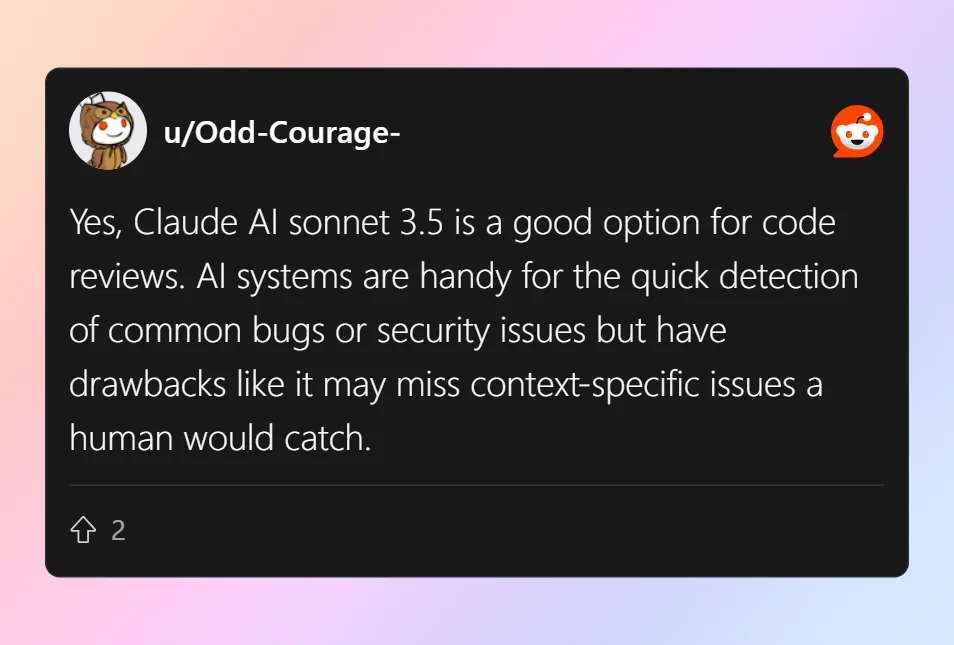
Reddit Comment

2) AI’s Limited Understanding of Business Logic

This is a significant challenge. An AI tool cannot validate that the code correctly implements a complex business rule. It can check if the code is well-written, but not if it does the right thing. Research published by ACM in late 2024 indicated that AI tools often struggle to identify errors in business logic without specific, human-provided context.

3) Tool Compatibility and Integration

For an AI tool to be effective, it must integrate smoothly into your existing tech stack. This includes your Integrated Development Environment (IDE), your CI/CD pipeline, and your Git platform (GitHub, GitLab, Bitbucket). Poor integration can create friction and hinder adoption.

4) Legal and Ethical Concerns

The use of AI in code review raises important questions about intellectual property (IP). For instance, the ongoing legal challenges involving GitHub Copilot allege that the service reproduces licensed open-source code without the required attribution, creating potential compliance and ownership disputes. 

Separately, regulatory frameworks like the European Union's AI Act are establishing new precedents, which could mandate transparency about machine-generated output. Consequently, teams must carefully examine the licensing terms of their tools and be aware of potential code originality issues to avoid legal risks.

AI Code Review on Popular Platforms

The power of AI code review is most apparent when it is deeply integrated into the platforms developers use every day.

Platform

Native AI Tool(s)

Third-Party Integration

Key Features

GitHub

GitHub Copilot

Yes (e.g., Codacy, Snyk via Marketplace)

Summarizes changes in pull requests, flags potential issues, and posts feedback as comments.

GitLab

GitLab Duo

Yes

Provides code suggestions, vulnerability analysis, and integrates into merge request workflows.

Bitbucket

(Primarily via Marketplace)

Yes (e.g., Codacy, Snyk)

Connects to repositories to provide automated analysis on pull requests within the Atlassian suite.

Visual Studio Code

(Via Extensions)

Yes (e.g., GitHub Copilot, Sourcery)

Offers real-time, in-editor feedback and code suggestions as the developer types.

IntelliJ / JetBrains

JetBrains AI Assistant

Yes

Provides in-editor chat, code generation, and analysis integrated with the IDE's inspection tools.

AWS

Amazon CodeGuru Reviewer

Yes

Uses machine learning to find critical bugs and recommends code quality improvements.

Azure

(Primarily via Marketplace)

Yes (via Azure DevOps Marketplace)

Adds automated code analysis as a step in CI/CD build and release pipelines.

AI Code Review on GitHub

GitHub is at the forefront of AI integration with GitHub Copilot. Copilot can now be used in pull requests to automatically summarize changes and flag potential issues. Many other tools from the marketplace, like Codacy and Snyk, also integrate directly into GitHub pull requests.

To set this up, you typically install a GitHub App, grant it repository access, and configure it to run on pull requests. The AI's feedback will then appear as comments directly on the changed files.

AI Code Review on GitLab

GitLab has its own suite of AI-powered features called GitLab Duo. It includes capabilities like Code Suggestions and vulnerability analysis. GitLab also supports integration with third-party AI tools, allowing you to embed automated reviews within its merge request workflow.

AI Code Review on Bitbucket

Bitbucket, part of the Atlassian suite, also supports AI code review through marketplace apps. Tools like Codacy and Snyk can connect to your Bitbucket repositories to provide automated analysis on pull requests, helping teams maintain code quality within the Atlassian ecosystem.

AI Code Review in Visual Studio Code (VSCode)

Many AI tools offer extensions for VSCode, bringing the review process directly into the editor. Extensions like GitHub Copilot, Codeant AI, and Sourcery provide real-time feedback and suggestions as you type, catching errors before they are ever committed.

AI Code Review in IntelliJ IDEA and JetBrains

The JetBrains family of IDEs offers its own AI Assistant. This tool provides in-editor chat, code generation, and analysis. It integrates with the IDE's powerful code inspection capabilities to offer a seamless AI-assisted development experience.

AI Code Review for Azure and AWS

Cloud platforms provide their own native solutions.

  • AWS offers Amazon CodeGuru Reviewer. It uses machine learning to identify critical issues and hard-to-find bugs in your code and provides recommendations to improve quality.

  • Azure DevOps integrates with various AI tools through its marketplace. It allows teams to add automated code analysis as a step in their build and release pipelines, ensuring code quality for applications deployed on Azure.

Generative AI and Its Role in Code Review

Generative AI represents the next frontier for AI-assisted development. This technology moves beyond simple analysis to active creation.

What is Generative AI in Code Review?

In the context of code review, generative AI does not just find problems—it actively suggests solutions. It can rewrite entire functions, generate boilerplate code, and create documentation. This technology uses Large Language Models (LLMs) to understand the intent behind code and produce human-like output. The AI code review becomes a creative partnership.
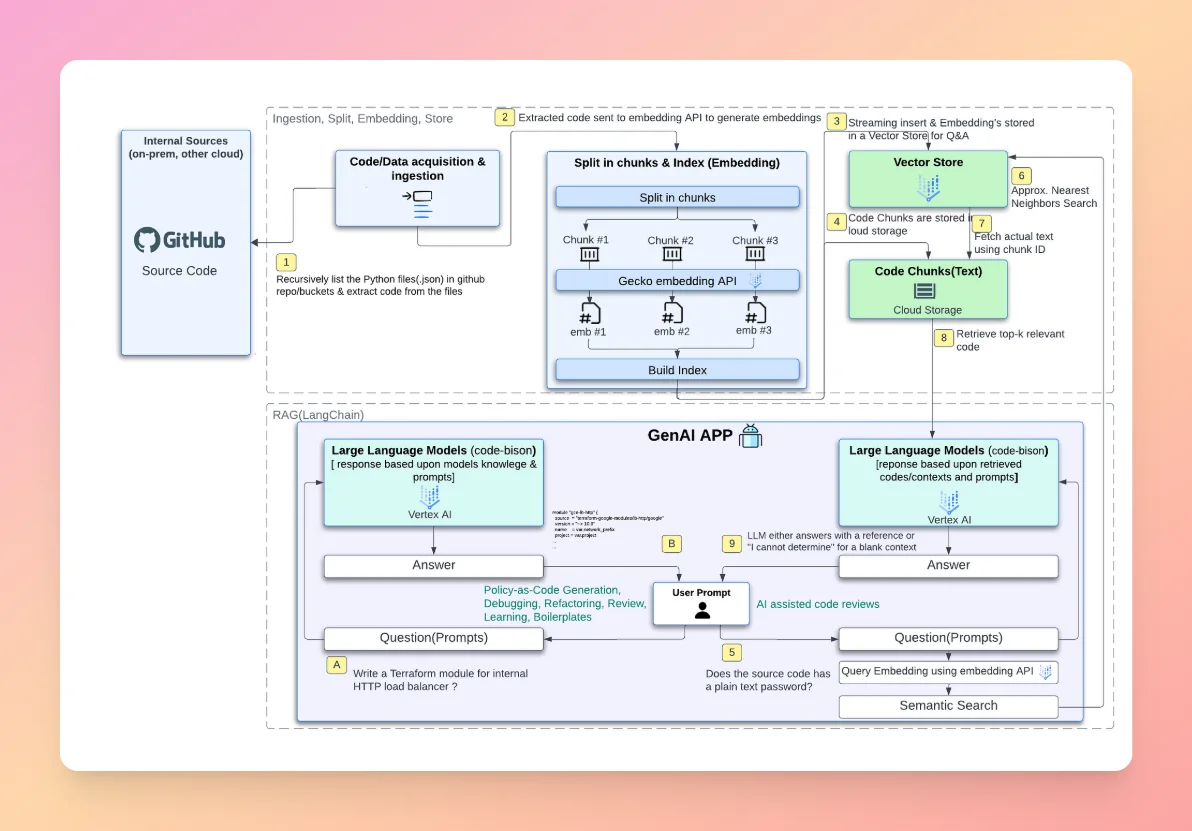
Generative AI

Examples of Generative AI in Code Review

Several tools are leading the way in this area.

  • GitHub Copilot: Perhaps the most well-known example, Copilot can suggest entire lines or blocks of code based on the current context. Its latest features are expanding into suggesting refactors during the review stage.

  • Claude AI Sonnet: Anthropic's powerful model can be used to analyze large blocks of code, explain their functionality in plain English, and suggest improvements or optimizations.

  • Graphite AI: This tool uses generative AI to help automate the entire pull request process, from writing descriptions to suggesting changes.

Limitations of Generative AI in Code Review

The primary challenge for generative AI is its struggle with comprehending complex, large-scale codebase architecture. While it excels at local, line-by-line suggestions, it can sometimes produce code that does not fit well with the broader system design. It may also hallucinate solutions that seem plausible but are functionally incorrect. Human oversight remains critical.

Conclusion

The trajectory of AI code review is clear: it will become more intelligent, more integrated, and more indispensable. We anticipate that future AI will have a deeper understanding of application-specific context and business logic. Gartner projects that by 2026, over 75% of enterprise development teams will rely on AI assistants for code generation or review, solidifying their place in the standard developer toolkit.

Should You Use AI for Code Review?

Yes. The question is no longer if you should use AI for code review, but how. A hybrid approach that combines the speed and consistency of AI with the contextual understanding and wisdom of human reviewers offers the most powerful solution. Let AI handle the routine checks so your team can focus on what matters most: building robust, innovative software.

FAQs: AI Code Review

1) Can You Use AI to Do Code Reviews?

Absolutely. AI tools are specifically designed to perform code reviews. They analyze code for bugs, security risks, style violations, and performance issues. They integrate with development platforms like GitHub to provide automated feedback on pull requests, acting as a tireless assistant to the development team.

2) Is the AI Code Legit?

The suggestions and code generated by AI tools are generally "legit" in that they are syntactically correct and often follow best practices. However, the legality regarding intellectual property can be complex. You must review the terms of service for any AI tool and be mindful of its training data to avoid potential IP infringement.

3) Is AI Actually Good at Coding?

AI has become remarkably proficient at coding, particularly for well-defined tasks. It excels at generating boilerplate code, writing unit tests, and implementing standard algorithms. While it can produce entire applications, its strength currently lies in assisting human developers rather than replacing them. Its ability to improve existing code is a proven benefit.

4) Is AI Code Legal?

The legality of AI-written code is an evolving area of law. The primary concern is copyright and ownership. Code generated by an AI may be derivative of the data it was trained on, which can include open-source code with various licenses. Companies should consult with legal counsel to establish clear policies on the use of AI-generated code in proprietary projects.

5) What is the best free AI code review tool in 2025?

Free tools like Codacy and Codeant AI are popular in 2025. Codacy offers a free tier for open-source projects, while Codeant AI integrates directly into IDEs with real-time feedback.

6) What’s the difference between AI code review and automated code review?

AI code review uses machine learning and generative AI to analyze and suggest fixes. Automated code review refers to embedding these checks into CI/CD pipelines, so every commit or pull request is reviewed automatically.

7) Which AI code review tools integrate with GitHub?

GitHub Copilot now reviews pull requests, and third-party tools like Codacy and Snyk also integrate natively. These appear as comments on PRs, providing automated feedback.

8) How does AI code review compare to manual code review?

AI reviews are faster, more consistent, and scalable. Manual reviews excel at understanding business logic and project-specific goals. A hybrid approach is usually best.

9) Is AI code review safe for proprietary code?

Yes, but you must verify the tool’s privacy and compliance policies. Tools that process code locally or offer enterprise compliance features are safest for proprietary projects.

10) How do I set up automated AI code review in my CI/CD pipeline?

  1. Choose a compatible tool (e.g., Codacy, Codeant AI).

  2. Install its integration or GitHub/GitLab app.

  3. Configure it to run on pull requests or commits.

  4. Review feedback directly in your version control system.

Ready to ship cleaner code, faster?

Start with Dualite, free to begin, live in minutes.

Overview

Ready to build real products at lightning speed?

Try the AI platform to turn your idea into reality in minutes!

Other Articles

Dualite vs Replit: Which AI App Builder Should You Choose in 2026?

Dualite and Replit are both AI app builders that turn plain-English prompts into deployable apps : but they are built for fundamentally different people. Dualite is a no-code AI app builder for founders, designers, and non-technical users — it ships unlimited messages on the $79/month Launch plan, predictable flat pricing with no surprise overages, dedicated 1-to-1 support, image and Midjourney uploads, 100+ high-quality templates, and full GitHub plus ZIP code access on the free Starter plan. Replit is a developer-first cloud IDE with an AI Agent on top — powerful for engineers comfortable with code editors and terminals, but it uses effort-based credit pricing where users routinely report $100-$300+ monthly bills against a $25 base plan, charges for failed AI operations, and reserves dedicated human support for Enterprise. If you want predictable pricing, real human support, and a workflow built for non-technical founders, Dualite is the better fit. If you are an experienced developer who wants a full cloud IDE with an AI agent and you can budget for unpredictable credit consumption, Replit can work.

Why compare Dualite and Replit?

Both Dualite and Replit sit in the broad AI app builder category : both turn natural-language prompts into deployable code, both have substantial user bases, and both let you go from idea to live URL without leaving the platform.

But the two platforms are solving fundamentally different problems for fundamentally different users. Replit is a full cloud IDE first — with a code editor, terminal, file tree, and deployment configuration — with the Agent layered on top. It is built for developers who want AI assistance inside an environment they already understand. Dualite is built the other way around : a prompt-and-preview interface where the code is the output, not the workspace, designed for founders and designers who want a finished product without learning the IDE.

That difference shows up in pricing, support, predictability, and how much technical comfort you need to bring. This guide breaks down where Dualite and Replit differ on the things that actually matter when you are shipping a real product.

Dualite vs Replit: Quick comparison at a glance

Here is the side-by-side breakdown across the features that decide which tool actually fits your workflow:

  • Free plan limits : Dualite gives you 5 messages with full feature access on the Starter plan and no Dualite badge on your output. Replit's Starter plan gives you free daily Agent credits, 1 published app, public projects only, and a "Made with Replit" badge that requires a paid plan to remove

  • Pricing model : Dualite uses simple message-based pricing: 5 free messages, 200 messages on Pro at $29/month, unlimited on Launch at $79/month. Replit uses effort-based credit pricing where every Agent action burns a variable amount of credits based on "effort" (time and computation), and Replit explicitly states "simple tasks may cost less than $0.25, more complex tasks may cost more than $0.25"

  • Unlimited plan : Dualite's Launch plan at $79/month is fully unlimited with no message caps. Replit has no unlimited tier at any price point Core at $20/month gives $20 in monthly credits that do not roll over, and Pro at $100/month gives $100 in credits with one-month rollover

  • Pricing predictability : Dualite's monthly bill is exactly what is on the plan page. Replit's pricing is well-documented as volatile : community reports of bills ranging from $100 to $300 against a $25 plan are common, and accounts have no spending caps by default unless manually configured

  • 1-to-1 customer support : Dualite's Launch plan includes dedicated 1-to-1 support with a product expert you can speak to anytime. Replit's Core plan offers community support only; Pro at $100/month gets "priority support" with under-24-hour responses on business days; dedicated support and SLAs are reserved for Enterprise (custom pricing)

  • Who it is built for : Dualite is built for non-technical founders, designers, and entrepreneurs who want a finished product. Replit is built for developers who want a cloud IDE with an AI agent inside it the workspace assumes you can read code, work with a terminal, and configure deployments

  • Image and Midjourney uploads : Dualite has first-class, documented support for attaching images, videos, and Midjourney outputs to guide the build, available on every plan. Replit supports image uploads in Agent chat as references, but the workflow is more developer-leaning

  • Design templates : Dualite ships 100+ high-quality, fully branded templates across e-commerce, dashboards, AI apps, mobile apps, portfolios, and games. Replit's templates are more developer-focused starter codebases (boilerplates, language starters, framework templates) rather than fully designed product templates

  • Charging for failed operations : Dualite charges per message regardless of whether you accept the result or revert. Replit charges for AI operations even when they fail, hang, or error out, per checkpoint well-documented in user billing reports

  • Partner Program : Dualite has a dedicated expert build service for founders stuck at 60-80% of their product. Replit has no equivalent managed handoff program : if you get stuck, you hire a developer or post in the community forum

How do Dualite and Replit compare on pricing?

This is where the two platforms diverge the most not just in numbers, but in how predictable your monthly bill actually is.

Dualite uses message-based pricing. A message is any instruction you send : the first prompt, a layout tweak, a feature addition. Every interaction counts as one message, regardless of complexity. The Starter plan gives 5 free messages, Pro gives 200 messages for $29/month, and Launch gives unlimited messages for $79/month. Annual billing saves up to 20%. The plan price is the bill. There are no overages, no "effort" multipliers, no surprises.

Replit uses effort-based credit pricing. Every Agent action consumes a variable amount of credits depending on "effort" measured in time and computation. Replit's own pricing documentation states this directly: "simple tasks may cost less than $0.25, more complex tasks may cost more than $0.25." The Free Starter plan gives limited daily credits and 1 published app. Core is $20/month and includes $20 in credits. Pro is $100/month with $100 in credits. Enterprise is custom. None of these tiers is unlimited, and credits expire monthly on Core (Pro gets one-month rollover).

The practical difference is enormous. With Dualite Launch, your monthly cost is $79. With Replit, your $25 plan can become a $200+ bill on a heavy build month community reports of $100-$300 monthly bills against a $25 plan are well-documented. Replit accounts also have no spending caps by default; you have to manually configure cost controls to avoid runaway bills.

Why does pricing predictability matter?

Effort-based pricing creates a specific problem: you cannot budget for it.

A simple feature might cost $0.25 in credits. A complex feature with a long debugging loop might cost $5. Multiple back-and-forth corrections on a stubborn bug can cost $20 or more for what feels like a single task. And because Replit charges for failed operations — yes, even when the AI hangs, errors out, or simply does nothing — unsuccessful attempts still consume your credit balance.

Dualite's flat pricing removes that uncertainty entirely. Build stress-free. Iterate as many times as you want. Try ten variations of the same screen if that is what your product needs. The whole reason to use an AI builder is speed — a credit meter that punishes complexity, debugging, and iteration defeats the point. And on Launch, every message is unlimited anyway.

This is especially valuable for:

  • Solo founders shipping an MVP and validating it through 10 to 20 design iterations

  • Agencies running multiple client projects in parallel with predictable monthly costs

  • Teams building production-grade apps where edge cases require dozens of follow-up prompts

  • Anyone who has been burned by an unexpected $200 bill on what was supposed to be a $25 plan

Who is each platform actually built for?

This is the second-biggest difference between Dualite and Replit and the one most users miss before signing up.

Dualite is built for non-technical founders and designers. The workspace is a prompt-and-preview interface : you describe what you want, you see it built, you click on elements to refine them in plain English, and you publish. The code is the output, not the workspace. You do not need to read it, edit it, or understand it to ship a working product. Interaction Mode lets you click any element and instruct the AI in natural language. Fix with AI handles errors automatically. The whole experience is designed so that someone who has never opened a code editor can ship a complete app.

Replit is built for developers. The workspace is a full cloud IDE a code editor on the left, file tree, terminal, deployment configurations, environment variables, and the Agent panel. The Agent is excellent at autonomous coding (Replit's Agent 3 can run for hours on complex tasks), but the surrounding environment assumes you can read the code it writes, work with a terminal when something goes wrong, and understand concepts like compute units, autoscale deployments, reserved VMs, and CIDR-block configurations. Replit's documentation, community, and product are all written for technical users.

This is not a knock on Replit it is a deliberate product choice, and Replit is genuinely strong for the developers it serves. But for a non-technical founder, the IDE itself becomes a barrier. You are not just learning to use an AI builder; you are learning to use a development environment.

What does customer support look like on each platform?

When you are stuck at midnight on a launch deadline, the difference between "talk to a human now" and "submit a ticket and wait" is enormous.

Dualite Launch includes dedicated 1-to-1 support. You get a real product expert not a chatbot, not a queue who knows the platform inside out and can help you unblock specific build issues, optimise prompts, or restructure complex projects. Pro plan users get priority email and Discord support with 2-hour response times.

Replit's support is tiered toward Enterprise. The free Starter plan gets community support only the Replit Discourse forum. Core at $20/month gives community support and standard email response times. Pro at $100/month upgrades you to "priority support" with under-24-hour responses on business days. Guaranteed customer support SLAs and dedicated account managers are reserved for Enterprise (custom pricing, sales call required).

If you are non-technical and learning as you build, having a human you can actually talk to is the difference between shipping in a week and giving up after two days. Replit's structure assumes you have the technical skills to debug your own problems and lean on the developer community when you need help.

How does pricing volatility show up in real bills?

Effort-based pricing sounds reasonable in theory : pay for what you use. In practice, it makes monthly costs hard to predict and easy to overrun.

Documented user reports tell the story:

  • One Replit user reported 632 Agent checkpoints in a single billing period at $0.25 each, totaling $158, plus 965 Assistant checkpoints at $0.05 each, adding another $48 — over $206 in checkpoint charges alone, on top of the base subscription

  • Charges for failed operations are well-documented — Replit users are billed per checkpoint regardless of whether the AI succeeded, hung mid-execution, or errored out

  • Once monthly credits are depleted, subsequent actions are billed directly to the payment method on file without prior notice unless the user has manually configured spending caps

  • Replit users on the Core plan have reported monthly bills of $100-$300 for what they expected to be a $25/month subscription

Dualite has none of this. Pro is $29/month for 200 messages. Launch is $79/month unlimited. There are no per-prompt charges, no "effort" multipliers, no overages, no charges for failed actions. The bill on the first of the month is exactly what is on the pricing page.

Can you upload images on Dualite and Replit?

Yes on Dualite, with first-class support. Dualite has dedicated documentation for attaching images, videos, and Midjourney outputs to your prompts. You can upload a screenshot of a UI you want to copy, a reference design, a logo, or even Midjourney-generated images and videos to guide the build. Image uploads work across all plans including the free Starter tier, and the workflow is built for visual-first thinkers.

Yes on Replit, but the workflow is developer-leaning. Replit Agent supports image attachments in chat as references for code generation, and you can paste Figma URLs into the Agent for design context. The Figma import flow works, but it is gated by Figma's own seat-type limits (free Figma users get 1 import per month). The workflow assumes you understand the code that will be generated from the image.

For designers, founders with mood boards, and anyone whose product idea is visual-first, Dualite's image and Midjourney workflow gives you a smoother path from inspiration to working app.

How do the design templates compare?

Templates are how non-designers ship something that looks professional. The quality and breadth of the template library directly affect how good your finished product looks.

Dualite ships 100+ high-quality templates built by the Dualite team and community contributors, across e-commerce (Lorvique, SOHO, Modern Sneaker Website, Norden, Potential Coffee), business and agency sites (Yellow Studio, Jane AI, Straton AI, Converge), restaurants (Horai), wellness (Soothemi), interiors (Claymist), real estate (1-Reserve), portfolios (Jenny Hu, Interactive Designer), banking dashboards (Nova), AI apps (AI Voice Receptionist, AI Fashion Studio, Van Gogh Styler, Memory Lane, Playful Typewriter), mobile apps (Cleer Finance, Investify), and games (Super Mario, FigJam-style flowchart builder). Every template is fully branded and free.

Replit's templates are developer-focused. The Replit Templates gallery is rich, but it leans toward starter codebases : language starters (Python, Node.js, Go), framework boilerplates (Next.js, Flask, FastAPI), and basic app skeletons. They are excellent if you are a developer looking for a working starter project. They are not finished, branded product templates the way Dualite's library is.

If your product needs to look impressive from the first screen as a complete branded experience, Dualite's library gives you a stronger starting point. If you want a clean Python or Next.js boilerplate to extend, Replit's templates work well.

Does Replit charge for failed AI operations?

Yes — and this is one of the most-discussed pain points in the Replit user community.

Replit's effort-based pricing model charges per checkpoint based on the AI's work. Critically, this charge applies regardless of whether the operation succeeded. Documented user reports confirm that:

  • Charges accumulate when AI operations did nothing useful

  • Charges apply when AI operations hung mid-execution and had to be killed

  • Charges apply when AI operations errored out and produced no usable result

  • All usage-based charges are non-refundable, even within the documented 30-day evaluation period

Dualite charges per message regardless of acceptance, but each message is a flat unit. A complex prompt that triggers heavy AI work counts as one message, the same as a simple prompt. There is no "effort multiplier" that bills you more when the AI struggles. And on Launch, every message is unlimited anyway — so failed attempts cost you nothing extra.

What if you get stuck at 80%? Dualite's Partner Program

Most AI builders leave you on your own when prompts stop working. Dualite has a dedicated solution: the Partner Program.

If you have built 60-80% of your product using Dualite but cannot finish the last stretch — maybe you need a complex backend integration, a specialised API hookup, or custom logic that prompts cannot describe — Dualite's expert team picks up where you left off and delivers a finished, deployed product, typically in days rather than months. It is a structured, managed service from the team that built the platform.

Replit has no equivalent. If you get stuck on Replit, your options are: post in the Replit Discourse community forum, hire a freelance developer to take over the project, or burn more credits trying to debug it yourself. There is no managed expert-handoff program from the Replit team. The Partner Program is a real differentiator for non-technical founders who care more about shipping than about doing every step themselves.

Which AI models power each platform?

Dualite uses three leading models across all plans : OpenAI GPT 5.1, Claude Sonnet 4.5 by Anthropic, and Google Gemini 3 Pro. Free Starter users get the same AI quality as Launch users — the only difference between plans is message count and support level. Dualite picks the best model for each task automatically, or you can specify your preference.

Replit Agent uses multiple models behind the scenes, primarily Claude Sonnet 4 with Replit's own orchestration layer (Agent 3) on top. Replit also offers different "modes" : Economy Mode and Power Mode on all plans, with Turbo Mode reserved for Pro and Enterprise. Higher-quality modes consume credits faster, so you pay for output quality through the credit system.

Across all three of Dualite's models, you get the same code generation quality whether you are on the free plan or paying $79/month. With Replit, even on a paid plan, switching to a higher-quality mode means burning through credits faster.

What about visual editing and click-to-edit?

Both platforms have a way to edit specific elements without describing them in words — but the workflows are different.

Dualite's Interaction Mode. Click directly on any element in the live preview — a button, a card, a heading — type your change in plain English, and Dualite captures the element's exact technical metadata before applying the fix. No describing where the element is. No telling the AI which div to target. Just click and instruct. Built for non-technical users.

Replit's Visual Editor and Design Mode. Replit has a Visual Editor that lets you make UI tweaks inline, with controls for properties like padding, text color, and background color. Design Mode is more focused : you can convert a Design Mode project to a full application with a single click. The Visual Editor is genuinely useful for small style changes, but it is closer to "edit the generated code visually" than "click any element and tell the AI what to do in plain English."

For non-technical users, Dualite's Interaction Mode is significantly more intuitive. For developers comfortable with the IDE, Replit's Visual Editor is a productive addition to the workflow.

Which platform should you choose?

Here is a simple decision framework:

  • Choose Dualite if you want predictable flat pricing with no overages, need real 1-to-1 human support, are non-technical or design-focused, want a workspace built around prompts and preview rather than a full IDE, care about high-quality branded design templates, and need image and Midjourney workflows for visual-first building. Best for founders shipping real products, designers, agencies, and anyone who wants to focus on the product rather than on managing a credit budget

  • Choose Replit if you are an experienced developer who wants a full cloud IDE with an autonomous AI agent on top, are comfortable budgeting for unpredictable monthly costs, can configure spending caps and review credit usage, and want access to a code editor, terminal, and deployment configuration alongside the AI. Reasonable for developers who want AI assistance inside a familiar IDE environment

For most builders especially non-technical founders, designers, agencies, and anyone who values predictable monthly bills and human support Dualite's combination of unlimited messages, flat pricing with no surprises, dedicated 1-to-1 support, image and Midjourney workflows, 100+ premium templates, full free-plan feature access, and the Partner Program safety net is the more practical choice. Replit is a powerful developer tool, but it is built for developers — not for founders who want to ship a product without becoming engineers.

Frequently asked questions

Is Dualite cheaper than Replit?

It depends on how you measure it. Dualite Pro at $29/month gives you 200 messages — enough for a full MVP build cycle. Replit Core at $20/month sounds cheaper, but the $20 in monthly credits is consumed by Agent actions at variable "effort" rates, and users routinely report bills of $100-$300 against the $25 plan once heavy Agent usage kicks in. For unlimited usage, Dualite Launch is $79/month with no caps. Replit has no unlimited tier at any price point, and even Pro at $100/month is still credit-metered.

Does Dualite have a free plan like Replit?

Yes. Dualite's Starter plan is free with 5 messages and full access to every core feature 100+ templates, native mobile app builds, Figma import, GitHub import, ZIP download, image uploads, custom domain, backend database, Variables for storing API keys, and all three AI models. No credit card required, no Dualite branding on your output. Replit's Starter plan gives free daily Agent credits, 1 published app, public projects only, and a "Made with Replit" badge that requires a paid plan to remove.

Why are Replit bills so unpredictable?

Replit uses effort-based credit pricing : every Agent action costs a variable amount based on time and computation, with Replit explicitly noting that complex tasks may cost more than $0.25 per checkpoint. Replit also charges for failed AI operations, so unsuccessful attempts still consume credits. And accounts have no spending caps by default — once monthly credits are exhausted, the platform switches to pay-as-you-go billing automatically. Dualite's flat message-based pricing has none of these dynamics : the plan price is the bill.

Can I switch from Replit to Dualite?

Yes. Push your Replit project to GitHub from the Replit dashboard, then import the GitHub repository directly into Dualite using the GitHub import feature. You keep your existing code and continue building on top of it with prompts no rebuild required.

Does Replit have an unlimited plan?

No. Replit's pricing is entirely credit-based. Free Starter gives daily credits, Core at $20/month includes $20 in credits, Pro at $100/month includes $100 in credits with one-month rollover, and Enterprise is custom but none of these are truly unlimited. Once you exhaust your credits, you pay per use. Dualite's Launch plan at $79/month is the only fully unlimited tier in this comparison.

Which platform has better customer support?

Dualite. The Launch plan includes dedicated 1-to-1 support with a product expert not a ticket queue, not a chatbot. Pro plan users get priority email and Discord support with 2-hour response times. Replit's free and Core users get community support; Pro at $100/month gets "priority support" with under-24-hour responses on business days; dedicated SLAs and account managers are reserved for Enterprise (custom pricing, sales call required).

Which is better for non-technical founders?

Dualite, by a significant margin. Dualite is built specifically for non-technical users the workspace is a prompt-and-preview interface, Interaction Mode lets you click on elements instead of describing them, Fix with AI handles errors automatically, the Partner Program provides expert handoff if you get stuck, and 1-to-1 support means you have a human to talk to. Replit is a full cloud IDE with an AI agent inside it powerful for developers, but the workspace itself (code editor, terminal, deployment configurations) assumes you are technical.

Does Replit charge me for failed AI operations?

Yes. Replit's effort-based pricing charges per checkpoint based on the AI's work, regardless of whether the operation succeeded, hung mid-execution, or errored out. This is well-documented in user billing reports. Dualite charges per message but treats each message as a flat unit there is no "effort multiplier" that bills you more when the AI struggles, and on Launch every message is unlimited anyway.

Which platform owns my code?

You do, on both. Both Dualite and Replit let you take your full codebase out of the platform. Dualite includes a one-click ZIP download on every plan including the free Starter. Replit lets you push to GitHub or download files, with full ownership of the generated code. The portability difference is mostly about ease : Dualite's ZIP-on-free-plan is more frictionless than Replit's GitHub-first export workflow.

Ready to build without burning credits?

Sign up for Dualite's free Starter plan and ship your first project in under two minutes. No credit card. 5 free messages. Full access to 100+ templates, native mobile app builds, Figma import, GitHub import, image uploads, and all three AI models from day one.

Comparisons

Arnav Uniyal

Dualite vs V0 by Vercel: Which AI App Builder Should You Choose in 2026?

Dualite and v0 by Vercel both turn plain-English prompts into code, but they are built for very different people. Dualite is a full-stack, no-code AI app builder for founders, designers, and non-technical users — it ships unlimited messages on the $79/month Launch plan, builds web and mobile apps natively, includes 1-to-1 dedicated support, image and Midjourney uploads, 100+ templates, and full GitHub plus ZIP code access on the free Starter plan. v0 is a frontend-only UI generator built for React and Next.js developers in the Vercel ecosystem — it generates polished web components and pages, charges by token-based credits with no unlimited tier, has no native backend, no native mobile, no dedicated 1-to-1 support, and locks deployment into Vercel's infrastructure. If you want to ship a complete product end-to-end, Dualite is the better fit. If you are already a frontend developer who just needs beautiful React components for an existing Next.js codebase, v0 has its place.

Why compare Dualite and v0 by Vercel?

Both Dualite and v0 sit in the AI builder category, both turn natural-language prompts into deployable code, and both have meaningful traction — v0 alone supports over 6 million developers, and Dualite has 100k+ users across 150+ countries.

But the two platforms are solving fundamentally different problems. v0 is positioned as an AI pair programmer for frontend developers building inside the Vercel and Next.js ecosystem. Dualite is positioned as a complete app and website builder for non-technical founders who want a finished product, not just UI components.

That difference shows up in pricing, support, what you can actually build, and how much code or context you need to bring yourself. This guide breaks down where Dualite and v0 differ on the things that actually matter when you are shipping a real product.

Dualite vs v0: Quick comparison at a glance

Here is the side-by-side breakdown across the features that decide which tool actually fits your workflow:

  • Free plan limits — Dualite gives you 5 messages with full feature access on the Starter plan and no Dualite badge on your output. v0's free plan gives you $5 in monthly credits which can be exhausted in a single complex session, plus a v0 logo on your output that costs extra to remove

  • Unlimited plan — Dualite's Launch plan at $79/month is fully unlimited with no message caps. v0 has no unlimited tier at any price point — Premium at $20/month gives $20 in credits, Team at $30/user/month gives $30 per user, and Business at $100/user/month gives $30 per user with extra controls

  • 1-to-1 customer support — Dualite's Launch plan includes dedicated 1-to-1 support with a product expert you can speak to anytime. v0 reserves dedicated support and SLAs for the Enterprise plan only (custom pricing, sales call required); paid plans below that get standard email support

  • Mobile apps — Dualite natively builds iOS and Android mobile apps and ships dedicated mobile templates. v0 outputs web code only (React + Tailwind running in a browser); building a real mobile app means exporting the code and wrapping it in a WebView or rebuilding it in React Native yourself

  • Backend and full-stack — Dualite generates frontend, backend, database, and authentication in one workflow. v0 is frontend-only by design — it does not generate backend logic, databases, or authentication; you have to bring those yourself

  • Image uploads — Dualite has first-class, documented support for attaching images, videos, and Midjourney outputs. v0 supports image input, but the Figma import path has been frequently buggy per community reports (designs uploading as flat PNGs instead of editable layers)

  • Design templates — Dualite ships 100+ high-quality templates across e-commerce, dashboards, AI apps, mobile apps, portfolios, and games. v0 has "Blocks" and quick-start templates but does not market a specific count

  • GitHub integration — Dualite includes GitHub import on the free Starter plan. v0 supports GitHub sync on free, but full bidirectional Git integration was only added in February 2026

  • ZIP code download — Dualite includes full codebase ZIP download on the free Starter plan. v0's primary export path is GitHub-first and one-click deploy to Vercel

  • Deployment lock-in — Dualite lets you deploy to any host (Netlify integration is built in, ZIP download lets you take the code anywhere). v0's one-click deploy is to Vercel's infrastructure only

  • AI models — Dualite uses OpenAI GPT 5.1, Claude Sonnet 4.5, and Gemini 3 Pro across all plans. v0 uses three Vercel-fine-tuned proprietary models (Mini, Pro, Max), all priced differently per token

  • Partner Program — Dualite has a dedicated expert build service for founders stuck at 60-80% of their product. v0 has no equivalent

How do Dualite and v0 compare on pricing?

This is one of the most important differences between the two platforms.

Dualite uses message-based pricing. A message is any instruction you send — the first prompt, a layout tweak, a feature addition. Every interaction counts as one message, regardless of complexity. The Starter plan gives 5 free messages, Pro gives 200 messages for $29/month, and Launch gives unlimited messages for $79/month. Annual billing saves up to 20% across paid plans.

v0 uses token-based credit pricing. Every prompt, every iteration, every API call burns credits based on input and output tokens, with three different model tiers (Mini, Pro, Max) at different rates. The Free plan gives $5 in monthly credits which can be exhausted in a single complex session using the Pro or Max model. Premium is $20/month for $20 in credits, Team is $30/user/month for $30 per user, Business is $100/user/month with the same $30 credit per user (the extra cost goes to security and team controls). There is no unlimited tier. Credits do not roll over.

The practical difference: with Dualite Launch, you build, iterate, break, and rebuild without ever hitting a wall. With v0, even Premium users routinely run out of credits mid-project on complex generations and have to top up.

Why does the unlimited plan matter?

Token-based pricing creates a specific problem: you start optimising prompts to save tokens instead of focusing on building the best product.

You batch instructions you would rather send separately. You hesitate before letting the AI auto-fix an error because every retry has a price tag. You skip the third design iteration because you cannot afford the credits. v0's own community reports users blowing through €4 worth of credits on a single buggy Figma import.

Dualite's Launch plan removes that pressure entirely. Build stress-free. Iterate as many times as you want. Try ten variations of the same screen if that is what your product needs. The whole reason to use an AI builder is speed — a credit meter that punishes iteration defeats the point.

Can you build complete apps on each platform?

This is the second biggest functional gap between Dualite and v0.

Dualite generates complete, full-stack applications. Frontend, backend, database, authentication, custom domain, deployment — all in one workflow, all from the same prompts. You describe a finance dashboard, Dualite builds the UI, sets up the backend logic, configures the database, adds login, and gives you a deployed live URL.

v0 is frontend-only by design. It generates polished React components and pages using Next.js, Tailwind, and shadcn/ui — but it does not generate backend logic, databases, or authentication. v0 is explicit about this in its own documentation and community: it is a UI generator, not an app builder. To turn a v0 component into a working product, you have to bring your own backend (Supabase, Neon, your own API), wire up authentication yourself, and stitch the pieces together as a developer.

For founders, designers, and non-technical builders, that gap is the difference between shipping a product and ending up with a folder of unconnected components.

Can you build mobile apps on each platform?

Dualite natively builds mobile apps. From the dashboard, you select Mobile App as your project type and Dualite generates iOS and Android compatible code from the start. Dedicated mobile templates like Cleer Finance and Investify are available out of the box. You go from prompt to a real mobile app inside the same workflow.

v0 outputs web code only. It generates React DOM components (HTML, CSS, JavaScript) that run in a browser — not React Native code that compiles to a native mobile binary. To turn a v0 project into an actual mobile app, you have to either wrap it in a WebView (which Apple frequently rejects under Guideline 4.2 for not feeling native) or rebuild the entire UI layer in React Native yourself. Vercel's own engineering blog admits they did not share UI or state management code between the v0 web app and the v0 iOS app — because web React and React Native are fundamentally different.

If you need to be in the App Store or Google Play, Dualite is built for that. v0 is not.

What does customer support look like on each platform?

When you are stuck at midnight on a launch deadline, the difference between "talk to a human now" and "submit a ticket and wait" is enormous.

Dualite Launch includes dedicated 1-to-1 support. You get a real product expert — not a chatbot, not a queue — who knows the platform inside out and can help you unblock specific build issues, optimise prompts, or restructure complex projects. Pro plan users get priority email and Discord support with 2-hour response times.

v0 reserves dedicated support for Enterprise. Premium, Team, and Business users get standard email support. Guaranteed customer support SLAs, priority access, and dedicated account managers are Enterprise-only features (custom pricing, contact sales). For most solo developers and small teams, that means the same support tier whether you pay $20/month or $100/user/month.

If you are non-technical and learning as you build, having a human you can actually talk to is the difference between shipping in a week and giving up after two days.

Are you locked into a specific deployment platform?

This is a real architectural difference that affects long-term flexibility.

Dualite is deployment-agnostic. Built-in Netlify integration handles one-click deployment, but the ZIP code download option means you can take your codebase anywhere — Vercel, AWS, Cloudflare Pages, your own server, any host. You own the code, you choose the host.

v0 is built for the Vercel ecosystem. One-click deploy goes to Vercel only. While the generated code is portable React/Next.js, the deployment workflow, environment variable management, GitHub sync, and preview URLs are all designed around Vercel infrastructure. You can host v0-generated code elsewhere, but you lose most of the value of the integration.

If you are already on Vercel and plan to stay there, this is fine. If you want optionality, Dualite gives it to you for free.

Can you upload images on Dualite and v0?

Yes on Dualite, with first-class support. Dualite has dedicated documentation for attaching images and videos to your prompts — you can upload a screenshot of a UI you want to copy, a reference design, a logo, or even Midjourney-generated images and videos to guide the build. Image uploads work across all plans including the free Starter tier.

Yes on v0, but the Figma path has been buggy. v0 supports image upload as input. Figma import is available on Premium and above, but the Vercel community has been documenting persistent issues with the Figma integration — designs frequently upload as flat PNGs instead of editable layered files, even for Premium users. That defeats the point of the import and silently burns credits while you debug.

How do the design templates compare?

Templates are how non-designers ship something that looks professional. The quality and breadth of the template library directly affect how good your finished product looks.

Dualite ships 100+ high-quality templates built by the Dualite team and community contributors, across e-commerce (Lorvique, SOHO, Modern Sneaker Website, Norden, Potential Coffee), business and agency sites (Yellow Studio, Jane AI, Straton AI, Converge), restaurants (Horai), wellness (Soothemi), interiors (Claymist), real estate (1-Reserve), portfolios (Jenny Hu, Interactive Designer), banking dashboards (Nova), AI apps (AI Voice Receptionist, AI Fashion Studio, Van Gogh Styler, Memory Lane, Playful Typewriter), mobile apps (Cleer Finance, Investify), and games (Super Mario, FigJam-style flowchart builder). Every template is free.

v0 has Blocks and quick-start templates built around shadcn/ui components — authentication blocks, dashboard layouts, pricing pages, and similar developer-focused starting points. The library is solid and consistent, but it is component-first and developer-leaning, not finished branded product templates.

If your product needs to look impressive from the first screen as a complete branded experience, Dualite's library gives you a stronger starting point. If you want clean, accessibility-checked component primitives to drop into an existing codebase, v0's Blocks are excellent.

What if you get stuck at 80%? Dualite's Partner Program

Most AI builders leave you on your own when prompts stop working. Dualite has a dedicated solution: the Partner Program.

If you have built 60-80% of your product using Dualite but cannot finish the last stretch — maybe you need a complex backend integration, a specialised API hookup, or custom logic that prompts cannot describe — Dualite's expert team picks up where you left off and delivers a finished, deployed product, typically in days rather than months.

v0 has no equivalent. If you get stuck on v0, your options are: hire a developer, learn React deeper, or move to a different tool. The Partner Program is a real safety net for founders who care more about shipping than about doing every step themselves.

Which AI models power each platform?

Dualite uses three leading models across all plans — OpenAI GPT 5.1, Claude Sonnet 4.5 by Anthropic, and Google Gemini 3 Pro. Free Starter users get the same AI quality as Launch users.

v0 uses three Vercel-fine-tuned proprietary models — v0 Mini, v0 Pro, and v0 Max. Each tier has different token costs, with Max being the most expensive and most capable. The models are tuned specifically for React and Next.js code generation, which is why v0's frontend output quality is genuinely strong — but the trade-off is you cannot pick a different model for tasks where another foundation model might do better.

If you care about model choice and transparency, Dualite gives you both. If you just want polished React output and trust Vercel's tuning, v0's models are good at what they do.

Which platform should you choose?

Here is a simple decision framework:

  • Choose Dualite if you want unlimited builds without a credit meter, need full-stack apps (frontend + backend + database + auth), need to build mobile apps, need real 1-to-1 support, are non-technical, want deployment optionality, and care about getting a finished product rather than components. Best for founders, designers, agencies, and anyone shipping real products

  • Choose v0 by Vercel if you are an experienced React or Next.js developer who already has a backend, deploys to Vercel anyway, just needs polished frontend components or pages dropped into an existing codebase, and is comfortable managing a credit budget. Reasonable for senior frontend engineers and Vercel-native teams

For most builders — especially anyone non-technical, anyone shipping mobile apps, anyone who needs a backend, and anyone who values being able to talk to a human when things break — Dualite's combination of unlimited messages, dedicated support, native mobile builds, full-stack generation, image and Midjourney workflows, 100+ premium templates, and full free-plan feature access is the more practical choice.

Frequently asked questions

Is Dualite cheaper than v0 by Vercel?

It depends on what you are building. Dualite Pro at $29/month gives you 200 messages — roughly equivalent to a full MVP build cycle. v0 Premium at $20/month gives you $20 worth of credits, which sounds cheaper until you realise complex generations using v0 Pro or Max can exhaust that in one session. For unlimited usage, Dualite Launch is $79/month with no caps. v0 has no unlimited tier at any price point — even the $100/user/month Business plan is still capped at $30 of credits per user.

Does Dualite have a free plan like v0?

Yes. Dualite's Starter plan is free with 5 messages and full access to every core feature — 100+ templates, native mobile app builds, Figma import, GitHub import, ZIP download, image uploads, custom domain, backend database, Variables for storing API keys, and all three AI models. No credit card required, no Dualite branding on your output. v0's free plan gives $5 of credits, includes a v0 logo on output, and removing the logo is a paid feature.

Can I build a mobile app with v0 by Vercel?

Not natively. v0 generates React DOM code that runs in a browser. To turn a v0 project into a real mobile app, you have to either wrap it in a WebView (which Apple often rejects) or rebuild the UI layer in React Native yourself. Dualite builds iOS and Android compatible apps natively from the dashboard with no rebuild required.

Can I build a backend with v0 by Vercel?

No. v0 is frontend-only by design — it generates UI components and pages but does not generate backend logic, databases, or authentication. You bring your own backend (Supabase, Neon, your own API). Dualite generates frontend, backend, database, and authentication in one workflow.

Can I switch from v0 to Dualite?

Yes. Push your v0 project to GitHub from the v0 dashboard, then import the GitHub repository directly into Dualite using the GitHub import feature on the dashboard. You keep your existing UI code and continue building on top of it with prompts — and Dualite can add the backend, authentication, and mobile build paths that v0 does not generate.

Does v0 have an unlimited plan?

No. v0's pricing is entirely token-based. Free gives $5 in credits, Premium gives $20, Team gives $30 per user, and Business gives $30 per user with extra security controls — but none of these are unlimited. Credits do not roll over either. Dualite's Launch plan at $79/month is the only fully unlimited tier in this comparison.

Which platform has better customer support?

Dualite. The Launch plan includes dedicated 1-to-1 support with a product expert — not a ticket queue, not a chatbot. v0 reserves guaranteed SLAs, priority access, and dedicated support for the Enterprise plan only (custom pricing, sales call required). Premium, Team, and Business users get standard email support.

Which is better for non-technical founders?

Dualite. It is built specifically for non-technical users — Interaction Mode lets you click on elements instead of describing them, Fix with AI handles errors automatically, the Partner Program provides expert handoff if you get stuck, and 1-to-1 support means you have a human to talk to. v0 is built for React and Next.js developers — it assumes you already know the framework, can wire up your own backend, and are comfortable with Vercel's infrastructure.

Am I locked into Vercel if I use v0?

In practice, yes. v0's one-click deploy goes to Vercel only, and the GitHub sync, environment variables, and preview URLs are all built around Vercel infrastructure. The generated React code itself is portable, but you lose most of v0's workflow advantages if you host elsewhere. Dualite is deployment-agnostic — ZIP download lets you take your code to any host.

Ready to build a complete product, not just components?

Sign up for Dualite's free Starter plan and ship your first project in under two minutes. No credit card. 5 free messages. Full access to 100+ templates, native mobile app builds, full-stack generation (frontend + backend + database + auth), Figma import, GitHub import, image uploads, and all three AI models from day one.

Comparisons

Arnav Uniyal

Dualite vs Lovable: Which AI App Builder Should You Choose in 2026?

Dualite and Lovable are both AI app builders that turn plain-English prompts into working products : but they make very different choices on pricing, support, and what you can build. Dualite gives you a true unlimited plan at $79/month, dedicated 1-to-1 support with a product expert, native mobile app builds, image and Midjourney uploads, 100+ high-quality templates, and full GitHub and ZIP code access on the free Starter plan. Lovable uses a credit-based pricing model with no unlimited tier, AI-first support that escalates to humans on request, and is web-only by design : building a mobile app means exporting your code and wrapping it in Capacitor or Expo yourself. If you want to build mobile apps, get human support, and not count credits, Dualite is the better fit. If you only need a web prototype and are comfortable managing a credit budget, Lovable can work.

Why compare Dualite and Lovable?

Both Dualite and Lovable sit in the same broad category : AI-powered app builders that generate real, deployable code from plain-English prompts. Both use modern tech stacks (React, TypeScript, Tailwind, Supabase) and both let founders, designers, and developers ship products without writing code from scratch.

But the two platforms diverge sharply once you look past the marketing pages. Lovable charges by credits : every prompt, every fix, every iteration costs credits, and complex features cost more than simple ones. Dualite charges by messages, with a true unlimited tier on its Launch plan : the platform's positioning says it directly: "Kill tokens. One Subscription. Infinite Possibilities."

This guide breaks down where Dualite and Lovable differ on the things that actually matter when you are shipping a real product : pricing, support, what you can actually build, image and design workflows, and what happens when you get stuck.

Dualite vs Lovable: Quick comparison at a glance

Here is the side-by-side breakdown across the features that decide which tool actually fits your workflow:

  • Free plan limits : Dualite gives you 5 messages with full feature access on the Starter plan and no Dualite badge on your output. Lovable gives you 5 daily credits (capped at around 30 per month), public projects only, and a Lovable badge on every site you publish

  • Unlimited plan : Dualite's Launch plan at $79/month is fully unlimited with no message caps. Lovable has no unlimited tier at any price point : even the Business plan at $50/month starts at 100 credits/month and scales by buying more credits

  • 1-to-1 customer support : Dualite's Launch plan includes dedicated 1-to-1 support with a product expert you can speak to anytime. Lovable's support is AI-first : you submit a form, get an instant AI response, and only request human escalation if that does not solve it. Free users get community support only

  • Mobile apps : Dualite natively builds iOS and Android mobile apps and ships dedicated mobile templates (Cleer Finance, Investify). Lovable is web-only : building a true mobile app means exporting your code and wrapping it in Capacitor, Expo, or a third-party tool like Twinr

  • Image and Midjourney uploads : Dualite has first-class, documented support for attaching images, videos, and Midjourney outputs to guide the AI. Lovable supports image input but does not have the same Midjourney-native workflow

  • Design templates : Dualite ships 100+ high-quality templates from the Dualite team and community contributors, across e-commerce, dashboards, AI apps, mobile apps, portfolios, and games. Lovable has a templates library too, but does not market a specific count

  • GitHub integration : Dualite includes GitHub import on the free Starter plan. Lovable's GitHub sync is available on Pro and above, not free

  • ZIP code download : Dualite includes full codebase ZIP download on the free Starter plan. Lovable lets you export to GitHub but not directly as a ZIP

  • AI models : Dualite uses OpenAI GPT 5.1, Claude Sonnet 4.5, and Gemini 3 Pro across all plans, including the free Starter tier. Lovable does not publicly specify a multi-model selector for end users

  • Partner Program : Dualite has a dedicated expert build service for founders stuck at 60-80% of their product. Lovable points users to a "Hire a Lovable expert" directory but does not run a structured handoff program

How do Dualite and Lovable compare on pricing?

This is the most important difference between the two platforms.

Dualite uses message-based pricing. A message is any instruction you send : the first prompt, a layout tweak, a feature addition. Every interaction counts as one message. The Starter plan gives 5 free messages, Pro gives 200 messages for $29/month, and Launch gives unlimited messages for $79/month. Annual billing saves up to 20% across paid plans.

Lovable uses credit-based pricing. Different actions cost different amounts of credits : a styling tweak might cost half a credit, a new component around 0.8 credits, and a complex feature like authentication or a dashboard around 1.2 credits or more. The Free plan gives 5 daily credits (capped at roughly 30 per month). Pro starts at $25/month for 100 credits, scaling up to 10,000 credits at higher tiers. Business is $50/month with the same starting credit allowance plus team features. There is no unlimited tier.

The practical difference: with Dualite Launch, you build, iterate, break, and rebuild without ever hitting a wall. With Lovable, you are constantly aware of your credit balance : and many users report that "Try to Fix" loops on stubborn bugs can quietly drain credits without solving the problem.

Why does the unlimited plan matter?

Credit-based pricing creates a specific psychological problem: you start optimising prompts to save credits instead of focusing on building the best product.

You batch instructions you would rather send separately. You hesitate before letting the AI auto-fix an error because you have read about debugging loops eating credits. You delay design experiments because each iteration has a price tag.

Dualite's Launch plan removes that pressure entirely. Build stress-free. Iterate as many times as you want. Try ten variations of the same screen if that is what your product needs. The whole reason to use an AI builder is speed : a credit meter that punishes iteration defeats the point.

This is especially valuable for:

  • Solo founders shipping an MVP and validating it through 10 to 20 design iterations

  • Agencies running multiple client projects in parallel

  • Teams building production-grade apps where edge cases require dozens of follow-up prompts

  • Anyone who has been burned by hitting a credit wall mid-build

Can you build mobile apps on each platform?

This is the single biggest functional gap between Dualite and Lovable.

Dualite natively builds mobile apps. From the dashboard, you select Mobile App as your project type and Dualite generates iOS and Android compatible code from the start. There are dedicated mobile templates including Cleer Finance (a banking and finance app) and Investify (an investment tracker). You go from prompt to a real mobile app inside the same workflow : no exports, no third-party tools, no rebuilds.\

Lovable is web-only by design. It outputs standard React DOM code (HTML, CSS, JavaScript) that runs in a browser. To turn a Lovable project into an actual mobile app, you have to export the code to GitHub, install Capacitor or Expo, configure native iOS and Android projects, and either publish through Xcode and Android Studio yourself or use a third-party service like Twinr or Newly. That is real engineering work, and Apple has rejected "wrapped" web apps for failing Guideline 4.2 (apps must feel native).

If your product needs to be in the App Store or Google Play, Dualite gets you there in the same flow you use to build the web version. With Lovable, mobile is a separate project.

What does customer support look like on each platform?

When you are stuck at midnight on a launch deadline, the difference between "talk to a human now" and "submit a form and wait" is enormous.

Dualite Launch includes dedicated 1-to-1 support. You get a real product expert : not a chatbot, not a queue : who knows the platform inside out and can help you unblock specific build issues, optimise prompts, or restructure complex projects. Pro plan users get priority email and Discord support with 2-hour response times.

Lovable's support is AI-first. Per Lovable's own published support policy, you submit a form, receive a near-instant AI response, and only request a human agent if the AI cannot solve your problem. Free users do not get official support at all : they are pointed to the Discord community. Dedicated human support and onboarding services are reserved for Enterprise (custom pricing, sales call required).

If you are non-technical and learning as you build, having a human you can actually talk to is the difference between shipping in a week and giving up after two days.

Can you upload images on Dualite and Lovable?

Yes on Dualite, with first-class support. Dualite has dedicated documentation for attaching images and videos to your prompts : you can upload a screenshot of a UI you want to copy, a reference design, a logo, or even Midjourney-generated images and videos to guide the build. Image uploads work across all plans including the free Starter tier.

Yes on Lovable, but the workflow is more general-purpose. Lovable supports image input in the chat to handle screenshots and reference designs. It does not have a dedicated Midjourney workflow the way Dualite does, and the documentation around visual-first building is less developed.

For designers, founders with mood boards, or anyone whose product idea is visual-first, Dualite's image and Midjourney workflow gives you a smoother path from inspiration to working app.

How do the design templates compare?

Templates are how non-designers ship something that looks professional. The quality and breadth of the template library directly affect how good your finished product looks.

Dualite ships 100+ high-quality templates built by the Dualite team and community contributors, across e-commerce (Lorvique, SOHO, Modern Sneaker Website, Norden, Potential Coffee), business and agency sites (Yellow Studio, Jane AI, Straton AI, Converge), restaurants (Horai), wellness (Soothemi), interiors (Claymist), real estate (1-Reserve), portfolios (Jenny Hu, Interactive Designer), banking dashboards (Nova), AI apps (AI Voice Receptionist, AI Fashion Studio, Van Gogh Styler, Memory Lane, Playful Typewriter), mobile apps (Cleer Finance, Investify), and games (Super Mario, FigJam-style flowchart builder). Every template is free.

Lovable maintains a templates library but does not market a specific count or category breakdown the same way. The library leans toward dashboards, internal tools, and SaaS prototypes : reflecting Lovable's general positioning as a tool for product managers and SaaS founders rather than for branded consumer-facing products.

If your product needs to look impressive from the first screen : a startup landing page, a portfolio, an e-commerce store, a restaurant site : Dualite's curated library gives you a stronger starting point.

Is GitHub integration included on the free plan?

Yes on Dualite. GitHub import is included on the free Starter plan as "Upload existing projects from GitHub". You can pull an existing repository directly into Dualite and continue building on top of it using prompts : no upgrade required.

Not on Lovable's free plan. GitHub sync and version control are Pro plan features at $25/month and above. Free users get public projects on a Lovable subdomain only : no private projects, no GitHub bidirectional sync, no version history outside the platform.

If GitHub is part of your workflow (and it should be for any serious build), Dualite's free-plan-included integration is a real advantage.

Can you download your code as a ZIP on the free plan?

Yes on Dualite : full codebase ZIP download is included on the free Starter plan. Click the download icon next to the Publish button and you get every file, ready to take to any developer or hosting platform. You own the code completely.

Lovable's export path is GitHub-first. You export your project to GitHub and from there clone it locally or download a ZIP from the GitHub UI. There is no direct one-click ZIP download from Lovable itself, and on the free plan GitHub sync is not included : you would need to upgrade to Pro just to export your code outside the platform.

The bigger principle: you should never be locked into a platform. Dualite makes the exit door obvious from day one. Lovable makes you upgrade to use it.

What if you get stuck at 80%? Dualite's Partner Program

Most AI builders leave you on your own when prompts stop working. Dualite has a dedicated solution: the Partner Program.

If you have built 60-80% of your product using Dualite but cannot finish the last stretch : maybe you need a complex backend integration, a specialised API hookup, or custom logic that prompts cannot describe : Dualite's expert team picks up where you left off and delivers a finished, deployed product, typically in days rather than months.

Lovable points users to a "Hire a Lovable expert" directory : a marketplace of independent freelancers and agencies. That is useful, but it is a directory, not a managed handoff program. You vet, contract, and manage the expert yourself. Dualite's Partner Program is a structured service from the team that built the platform.

Which AI models power each platform?

Dualite uses three leading models across all plans : OpenAI GPT 5.1, Claude Sonnet 4.5 by Anthropic, and Google Gemini 3 Pro. Free Starter users get the same AI quality as Launch users : the only difference between plans is message count and support level.

Lovable does not publicly specify a multi-model selector for end users. The platform handles model selection internally, and users do not get the same explicit choice between OpenAI, Anthropic, and Google models that Dualite exposes.

For builders who care which AI is generating their code : or who want to switch models for different tasks : Dualite's transparency is meaningful.

What about Interaction Mode and visual editing?

Both platforms have a way to edit specific elements without describing them in words.

Dualite's Interaction Mode. Click directly on any element in the live preview : a button, a card, a heading : type your change in plain English, and Dualite captures the element's exact technical metadata before applying the fix. No describing where the element is. Just click and instruct.

Lovable's Select & Edit and Visual Edits. Lovable has a similar click-to-edit feature, plus a Visual Edits / Manual Edit mode for text, colours, and styling that does not consume credits. This is genuinely useful : for small styling changes, Lovable's no-credit visual edits are a real cost saver.

Both platforms are strong here. The functional difference is small. The pricing implications are bigger : on Dualite Launch, every edit is unlimited anyway. On Lovable, the no-credit visual edit mode is a way of working around the credit system.

Which platform should you choose?

Here is a simple decision framework:

  • Choose Dualite if you want unlimited builds without a credit meter, need to build mobile apps natively, need real 1-to-1 support, care about high-quality design templates, and want full feature access (GitHub, ZIP, image upload, all AI models) on the free plan. Best for founders shipping real products, agencies, anyone building mobile apps, and anyone who values stress-free iteration

  • Choose Lovable if you only need a web app or SaaS prototype, are comfortable managing a credit budget, like the option of free no-credit visual edits for small styling tweaks, and do not need 1-to-1 human support or native mobile builds. Reasonable for product managers prototyping internal tools and dashboards

For most builders : especially anyone shipping mobile apps, anyone who needs to iterate heavily without watching a meter, and anyone who values being able to talk to a human when things break : Dualite's combination of unlimited messages, dedicated support, native mobile builds, image and Midjourney workflows, 100+ premium templates, and full free-plan feature access is the more practical choice.

Frequently asked questions

Is Dualite cheaper than Lovable?

It depends on what you are building and how much you iterate. Dualite Pro at $29/month gives you 200 messages : roughly equivalent to a full MVP build cycle. Lovable Pro at $25/month gives you 100 credits, which sounds simpler but burns faster than expected because complex features cost more than one credit each. For unlimited usage, Dualite Launch is $79/month with no caps. Lovable has no unlimited tier at any price point.

Does Dualite have a free plan like Lovable?

Yes. Dualite's Starter plan is free with 5 messages and full access to every core feature : 100+ templates, Figma import, GitHub import, ZIP download, image uploads, custom domain, backend database, Variables for storing API keys, and all three AI models. No credit card required, no Dualite branding on your output. Lovable's free plan has 5 daily credits (capped around 30/month), public projects only, and a Lovable badge on every site.

Can I build a mobile app with Lovable?

Not natively. Lovable is web-only : it generates React DOM code that runs in a browser. To turn a Lovable project into a real mobile app, you have to export the code, install Capacitor or Expo, configure native iOS and Android projects, and ship through Xcode or Android Studio yourself, or pay for a third-party wrapper service. Dualite builds iOS and Android compatible apps natively from the dashboard.

Can I switch from Lovable to Dualite?

Yes. Export your Lovable project to GitHub from the Lovable dashboard, then import the GitHub repository directly into Dualite using the GitHub import feature on the dashboard. You keep your existing code and continue building on top of it with prompts.

Does Lovable have an unlimited plan?

No. Lovable's pricing is entirely credit-based. Pro at $25/month and Business at $50/month start at 100 credits each, and you can scale up to 10,000 credits per month at higher tiers : but there is no truly unlimited option. Dualite's Launch plan at $79/month is the only fully unlimited tier in this comparison.

Which platform has better customer support?

Dualite. The Launch plan includes dedicated 1-to-1 support with a product expert : not a ticket queue, not a chatbot. Lovable's support is AI-first by design : you submit a form, get an AI response, and request a human agent only if needed. Free Lovable users get community-only support, with no official channel.

Which is better for non-technical founders?

Dualite. It is built specifically for non-technical users : Interaction Mode lets you click on elements instead of describing them, Fix with AI handles errors automatically, the Partner Program provides expert handoff if you get stuck, and 1-to-1 support means you have a human to talk to. Lovable is more product-manager-leaning and assumes you are comfortable managing credits and using GitHub for exports.

Which platform owns my code?

You do, on both. Both Dualite and Lovable let you take your full codebase out of the platform. Dualite lets you download a ZIP directly on the free plan. Lovable requires Pro plan or above to enable GitHub sync, which is the primary export path on Lovable.

Ready to build without burning credits?

Sign up for Dualite's free Starter plan and ship your first project in under two minutes. No credit card. 5 free messages. Full access to 100+ templates, native mobile app builds, Figma import, GitHub import, image uploads, and all three AI models from day one.

Comparisons

Arnav Uniyal

Dualite vs Replit: Which AI App Builder Should You Choose in 2026?

Dualite and Replit are both AI app builders that turn plain-English prompts into deployable apps : but they are built for fundamentally different people. Dualite is a no-code AI app builder for founders, designers, and non-technical users — it ships unlimited messages on the $79/month Launch plan, predictable flat pricing with no surprise overages, dedicated 1-to-1 support, image and Midjourney uploads, 100+ high-quality templates, and full GitHub plus ZIP code access on the free Starter plan. Replit is a developer-first cloud IDE with an AI Agent on top — powerful for engineers comfortable with code editors and terminals, but it uses effort-based credit pricing where users routinely report $100-$300+ monthly bills against a $25 base plan, charges for failed AI operations, and reserves dedicated human support for Enterprise. If you want predictable pricing, real human support, and a workflow built for non-technical founders, Dualite is the better fit. If you are an experienced developer who wants a full cloud IDE with an AI agent and you can budget for unpredictable credit consumption, Replit can work.

Why compare Dualite and Replit?

Both Dualite and Replit sit in the broad AI app builder category : both turn natural-language prompts into deployable code, both have substantial user bases, and both let you go from idea to live URL without leaving the platform.

But the two platforms are solving fundamentally different problems for fundamentally different users. Replit is a full cloud IDE first — with a code editor, terminal, file tree, and deployment configuration — with the Agent layered on top. It is built for developers who want AI assistance inside an environment they already understand. Dualite is built the other way around : a prompt-and-preview interface where the code is the output, not the workspace, designed for founders and designers who want a finished product without learning the IDE.

That difference shows up in pricing, support, predictability, and how much technical comfort you need to bring. This guide breaks down where Dualite and Replit differ on the things that actually matter when you are shipping a real product.

Dualite vs Replit: Quick comparison at a glance

Here is the side-by-side breakdown across the features that decide which tool actually fits your workflow:

  • Free plan limits : Dualite gives you 5 messages with full feature access on the Starter plan and no Dualite badge on your output. Replit's Starter plan gives you free daily Agent credits, 1 published app, public projects only, and a "Made with Replit" badge that requires a paid plan to remove

  • Pricing model : Dualite uses simple message-based pricing: 5 free messages, 200 messages on Pro at $29/month, unlimited on Launch at $79/month. Replit uses effort-based credit pricing where every Agent action burns a variable amount of credits based on "effort" (time and computation), and Replit explicitly states "simple tasks may cost less than $0.25, more complex tasks may cost more than $0.25"

  • Unlimited plan : Dualite's Launch plan at $79/month is fully unlimited with no message caps. Replit has no unlimited tier at any price point Core at $20/month gives $20 in monthly credits that do not roll over, and Pro at $100/month gives $100 in credits with one-month rollover

  • Pricing predictability : Dualite's monthly bill is exactly what is on the plan page. Replit's pricing is well-documented as volatile : community reports of bills ranging from $100 to $300 against a $25 plan are common, and accounts have no spending caps by default unless manually configured

  • 1-to-1 customer support : Dualite's Launch plan includes dedicated 1-to-1 support with a product expert you can speak to anytime. Replit's Core plan offers community support only; Pro at $100/month gets "priority support" with under-24-hour responses on business days; dedicated support and SLAs are reserved for Enterprise (custom pricing)

  • Who it is built for : Dualite is built for non-technical founders, designers, and entrepreneurs who want a finished product. Replit is built for developers who want a cloud IDE with an AI agent inside it the workspace assumes you can read code, work with a terminal, and configure deployments

  • Image and Midjourney uploads : Dualite has first-class, documented support for attaching images, videos, and Midjourney outputs to guide the build, available on every plan. Replit supports image uploads in Agent chat as references, but the workflow is more developer-leaning

  • Design templates : Dualite ships 100+ high-quality, fully branded templates across e-commerce, dashboards, AI apps, mobile apps, portfolios, and games. Replit's templates are more developer-focused starter codebases (boilerplates, language starters, framework templates) rather than fully designed product templates

  • Charging for failed operations : Dualite charges per message regardless of whether you accept the result or revert. Replit charges for AI operations even when they fail, hang, or error out, per checkpoint well-documented in user billing reports

  • Partner Program : Dualite has a dedicated expert build service for founders stuck at 60-80% of their product. Replit has no equivalent managed handoff program : if you get stuck, you hire a developer or post in the community forum

How do Dualite and Replit compare on pricing?

This is where the two platforms diverge the most not just in numbers, but in how predictable your monthly bill actually is.

Dualite uses message-based pricing. A message is any instruction you send : the first prompt, a layout tweak, a feature addition. Every interaction counts as one message, regardless of complexity. The Starter plan gives 5 free messages, Pro gives 200 messages for $29/month, and Launch gives unlimited messages for $79/month. Annual billing saves up to 20%. The plan price is the bill. There are no overages, no "effort" multipliers, no surprises.

Replit uses effort-based credit pricing. Every Agent action consumes a variable amount of credits depending on "effort" measured in time and computation. Replit's own pricing documentation states this directly: "simple tasks may cost less than $0.25, more complex tasks may cost more than $0.25." The Free Starter plan gives limited daily credits and 1 published app. Core is $20/month and includes $20 in credits. Pro is $100/month with $100 in credits. Enterprise is custom. None of these tiers is unlimited, and credits expire monthly on Core (Pro gets one-month rollover).

The practical difference is enormous. With Dualite Launch, your monthly cost is $79. With Replit, your $25 plan can become a $200+ bill on a heavy build month community reports of $100-$300 monthly bills against a $25 plan are well-documented. Replit accounts also have no spending caps by default; you have to manually configure cost controls to avoid runaway bills.

Why does pricing predictability matter?

Effort-based pricing creates a specific problem: you cannot budget for it.

A simple feature might cost $0.25 in credits. A complex feature with a long debugging loop might cost $5. Multiple back-and-forth corrections on a stubborn bug can cost $20 or more for what feels like a single task. And because Replit charges for failed operations — yes, even when the AI hangs, errors out, or simply does nothing — unsuccessful attempts still consume your credit balance.

Dualite's flat pricing removes that uncertainty entirely. Build stress-free. Iterate as many times as you want. Try ten variations of the same screen if that is what your product needs. The whole reason to use an AI builder is speed — a credit meter that punishes complexity, debugging, and iteration defeats the point. And on Launch, every message is unlimited anyway.

This is especially valuable for:

  • Solo founders shipping an MVP and validating it through 10 to 20 design iterations

  • Agencies running multiple client projects in parallel with predictable monthly costs

  • Teams building production-grade apps where edge cases require dozens of follow-up prompts

  • Anyone who has been burned by an unexpected $200 bill on what was supposed to be a $25 plan

Who is each platform actually built for?

This is the second-biggest difference between Dualite and Replit and the one most users miss before signing up.

Dualite is built for non-technical founders and designers. The workspace is a prompt-and-preview interface : you describe what you want, you see it built, you click on elements to refine them in plain English, and you publish. The code is the output, not the workspace. You do not need to read it, edit it, or understand it to ship a working product. Interaction Mode lets you click any element and instruct the AI in natural language. Fix with AI handles errors automatically. The whole experience is designed so that someone who has never opened a code editor can ship a complete app.

Replit is built for developers. The workspace is a full cloud IDE a code editor on the left, file tree, terminal, deployment configurations, environment variables, and the Agent panel. The Agent is excellent at autonomous coding (Replit's Agent 3 can run for hours on complex tasks), but the surrounding environment assumes you can read the code it writes, work with a terminal when something goes wrong, and understand concepts like compute units, autoscale deployments, reserved VMs, and CIDR-block configurations. Replit's documentation, community, and product are all written for technical users.

This is not a knock on Replit it is a deliberate product choice, and Replit is genuinely strong for the developers it serves. But for a non-technical founder, the IDE itself becomes a barrier. You are not just learning to use an AI builder; you are learning to use a development environment.

What does customer support look like on each platform?

When you are stuck at midnight on a launch deadline, the difference between "talk to a human now" and "submit a ticket and wait" is enormous.

Dualite Launch includes dedicated 1-to-1 support. You get a real product expert not a chatbot, not a queue who knows the platform inside out and can help you unblock specific build issues, optimise prompts, or restructure complex projects. Pro plan users get priority email and Discord support with 2-hour response times.

Replit's support is tiered toward Enterprise. The free Starter plan gets community support only the Replit Discourse forum. Core at $20/month gives community support and standard email response times. Pro at $100/month upgrades you to "priority support" with under-24-hour responses on business days. Guaranteed customer support SLAs and dedicated account managers are reserved for Enterprise (custom pricing, sales call required).

If you are non-technical and learning as you build, having a human you can actually talk to is the difference between shipping in a week and giving up after two days. Replit's structure assumes you have the technical skills to debug your own problems and lean on the developer community when you need help.

How does pricing volatility show up in real bills?

Effort-based pricing sounds reasonable in theory : pay for what you use. In practice, it makes monthly costs hard to predict and easy to overrun.

Documented user reports tell the story:

  • One Replit user reported 632 Agent checkpoints in a single billing period at $0.25 each, totaling $158, plus 965 Assistant checkpoints at $0.05 each, adding another $48 — over $206 in checkpoint charges alone, on top of the base subscription

  • Charges for failed operations are well-documented — Replit users are billed per checkpoint regardless of whether the AI succeeded, hung mid-execution, or errored out

  • Once monthly credits are depleted, subsequent actions are billed directly to the payment method on file without prior notice unless the user has manually configured spending caps

  • Replit users on the Core plan have reported monthly bills of $100-$300 for what they expected to be a $25/month subscription

Dualite has none of this. Pro is $29/month for 200 messages. Launch is $79/month unlimited. There are no per-prompt charges, no "effort" multipliers, no overages, no charges for failed actions. The bill on the first of the month is exactly what is on the pricing page.

Can you upload images on Dualite and Replit?

Yes on Dualite, with first-class support. Dualite has dedicated documentation for attaching images, videos, and Midjourney outputs to your prompts. You can upload a screenshot of a UI you want to copy, a reference design, a logo, or even Midjourney-generated images and videos to guide the build. Image uploads work across all plans including the free Starter tier, and the workflow is built for visual-first thinkers.

Yes on Replit, but the workflow is developer-leaning. Replit Agent supports image attachments in chat as references for code generation, and you can paste Figma URLs into the Agent for design context. The Figma import flow works, but it is gated by Figma's own seat-type limits (free Figma users get 1 import per month). The workflow assumes you understand the code that will be generated from the image.

For designers, founders with mood boards, and anyone whose product idea is visual-first, Dualite's image and Midjourney workflow gives you a smoother path from inspiration to working app.

How do the design templates compare?

Templates are how non-designers ship something that looks professional. The quality and breadth of the template library directly affect how good your finished product looks.

Dualite ships 100+ high-quality templates built by the Dualite team and community contributors, across e-commerce (Lorvique, SOHO, Modern Sneaker Website, Norden, Potential Coffee), business and agency sites (Yellow Studio, Jane AI, Straton AI, Converge), restaurants (Horai), wellness (Soothemi), interiors (Claymist), real estate (1-Reserve), portfolios (Jenny Hu, Interactive Designer), banking dashboards (Nova), AI apps (AI Voice Receptionist, AI Fashion Studio, Van Gogh Styler, Memory Lane, Playful Typewriter), mobile apps (Cleer Finance, Investify), and games (Super Mario, FigJam-style flowchart builder). Every template is fully branded and free.

Replit's templates are developer-focused. The Replit Templates gallery is rich, but it leans toward starter codebases : language starters (Python, Node.js, Go), framework boilerplates (Next.js, Flask, FastAPI), and basic app skeletons. They are excellent if you are a developer looking for a working starter project. They are not finished, branded product templates the way Dualite's library is.

If your product needs to look impressive from the first screen as a complete branded experience, Dualite's library gives you a stronger starting point. If you want a clean Python or Next.js boilerplate to extend, Replit's templates work well.

Does Replit charge for failed AI operations?

Yes — and this is one of the most-discussed pain points in the Replit user community.

Replit's effort-based pricing model charges per checkpoint based on the AI's work. Critically, this charge applies regardless of whether the operation succeeded. Documented user reports confirm that:

  • Charges accumulate when AI operations did nothing useful

  • Charges apply when AI operations hung mid-execution and had to be killed

  • Charges apply when AI operations errored out and produced no usable result

  • All usage-based charges are non-refundable, even within the documented 30-day evaluation period

Dualite charges per message regardless of acceptance, but each message is a flat unit. A complex prompt that triggers heavy AI work counts as one message, the same as a simple prompt. There is no "effort multiplier" that bills you more when the AI struggles. And on Launch, every message is unlimited anyway — so failed attempts cost you nothing extra.

What if you get stuck at 80%? Dualite's Partner Program

Most AI builders leave you on your own when prompts stop working. Dualite has a dedicated solution: the Partner Program.

If you have built 60-80% of your product using Dualite but cannot finish the last stretch — maybe you need a complex backend integration, a specialised API hookup, or custom logic that prompts cannot describe — Dualite's expert team picks up where you left off and delivers a finished, deployed product, typically in days rather than months. It is a structured, managed service from the team that built the platform.

Replit has no equivalent. If you get stuck on Replit, your options are: post in the Replit Discourse community forum, hire a freelance developer to take over the project, or burn more credits trying to debug it yourself. There is no managed expert-handoff program from the Replit team. The Partner Program is a real differentiator for non-technical founders who care more about shipping than about doing every step themselves.

Which AI models power each platform?

Dualite uses three leading models across all plans : OpenAI GPT 5.1, Claude Sonnet 4.5 by Anthropic, and Google Gemini 3 Pro. Free Starter users get the same AI quality as Launch users — the only difference between plans is message count and support level. Dualite picks the best model for each task automatically, or you can specify your preference.

Replit Agent uses multiple models behind the scenes, primarily Claude Sonnet 4 with Replit's own orchestration layer (Agent 3) on top. Replit also offers different "modes" : Economy Mode and Power Mode on all plans, with Turbo Mode reserved for Pro and Enterprise. Higher-quality modes consume credits faster, so you pay for output quality through the credit system.

Across all three of Dualite's models, you get the same code generation quality whether you are on the free plan or paying $79/month. With Replit, even on a paid plan, switching to a higher-quality mode means burning through credits faster.

What about visual editing and click-to-edit?

Both platforms have a way to edit specific elements without describing them in words — but the workflows are different.

Dualite's Interaction Mode. Click directly on any element in the live preview — a button, a card, a heading — type your change in plain English, and Dualite captures the element's exact technical metadata before applying the fix. No describing where the element is. No telling the AI which div to target. Just click and instruct. Built for non-technical users.

Replit's Visual Editor and Design Mode. Replit has a Visual Editor that lets you make UI tweaks inline, with controls for properties like padding, text color, and background color. Design Mode is more focused : you can convert a Design Mode project to a full application with a single click. The Visual Editor is genuinely useful for small style changes, but it is closer to "edit the generated code visually" than "click any element and tell the AI what to do in plain English."

For non-technical users, Dualite's Interaction Mode is significantly more intuitive. For developers comfortable with the IDE, Replit's Visual Editor is a productive addition to the workflow.

Which platform should you choose?

Here is a simple decision framework:

  • Choose Dualite if you want predictable flat pricing with no overages, need real 1-to-1 human support, are non-technical or design-focused, want a workspace built around prompts and preview rather than a full IDE, care about high-quality branded design templates, and need image and Midjourney workflows for visual-first building. Best for founders shipping real products, designers, agencies, and anyone who wants to focus on the product rather than on managing a credit budget

  • Choose Replit if you are an experienced developer who wants a full cloud IDE with an autonomous AI agent on top, are comfortable budgeting for unpredictable monthly costs, can configure spending caps and review credit usage, and want access to a code editor, terminal, and deployment configuration alongside the AI. Reasonable for developers who want AI assistance inside a familiar IDE environment

For most builders especially non-technical founders, designers, agencies, and anyone who values predictable monthly bills and human support Dualite's combination of unlimited messages, flat pricing with no surprises, dedicated 1-to-1 support, image and Midjourney workflows, 100+ premium templates, full free-plan feature access, and the Partner Program safety net is the more practical choice. Replit is a powerful developer tool, but it is built for developers — not for founders who want to ship a product without becoming engineers.

Frequently asked questions

Is Dualite cheaper than Replit?

It depends on how you measure it. Dualite Pro at $29/month gives you 200 messages — enough for a full MVP build cycle. Replit Core at $20/month sounds cheaper, but the $20 in monthly credits is consumed by Agent actions at variable "effort" rates, and users routinely report bills of $100-$300 against the $25 plan once heavy Agent usage kicks in. For unlimited usage, Dualite Launch is $79/month with no caps. Replit has no unlimited tier at any price point, and even Pro at $100/month is still credit-metered.

Does Dualite have a free plan like Replit?

Yes. Dualite's Starter plan is free with 5 messages and full access to every core feature 100+ templates, native mobile app builds, Figma import, GitHub import, ZIP download, image uploads, custom domain, backend database, Variables for storing API keys, and all three AI models. No credit card required, no Dualite branding on your output. Replit's Starter plan gives free daily Agent credits, 1 published app, public projects only, and a "Made with Replit" badge that requires a paid plan to remove.

Why are Replit bills so unpredictable?

Replit uses effort-based credit pricing : every Agent action costs a variable amount based on time and computation, with Replit explicitly noting that complex tasks may cost more than $0.25 per checkpoint. Replit also charges for failed AI operations, so unsuccessful attempts still consume credits. And accounts have no spending caps by default — once monthly credits are exhausted, the platform switches to pay-as-you-go billing automatically. Dualite's flat message-based pricing has none of these dynamics : the plan price is the bill.

Can I switch from Replit to Dualite?

Yes. Push your Replit project to GitHub from the Replit dashboard, then import the GitHub repository directly into Dualite using the GitHub import feature. You keep your existing code and continue building on top of it with prompts no rebuild required.

Does Replit have an unlimited plan?

No. Replit's pricing is entirely credit-based. Free Starter gives daily credits, Core at $20/month includes $20 in credits, Pro at $100/month includes $100 in credits with one-month rollover, and Enterprise is custom but none of these are truly unlimited. Once you exhaust your credits, you pay per use. Dualite's Launch plan at $79/month is the only fully unlimited tier in this comparison.

Which platform has better customer support?

Dualite. The Launch plan includes dedicated 1-to-1 support with a product expert not a ticket queue, not a chatbot. Pro plan users get priority email and Discord support with 2-hour response times. Replit's free and Core users get community support; Pro at $100/month gets "priority support" with under-24-hour responses on business days; dedicated SLAs and account managers are reserved for Enterprise (custom pricing, sales call required).

Which is better for non-technical founders?

Dualite, by a significant margin. Dualite is built specifically for non-technical users the workspace is a prompt-and-preview interface, Interaction Mode lets you click on elements instead of describing them, Fix with AI handles errors automatically, the Partner Program provides expert handoff if you get stuck, and 1-to-1 support means you have a human to talk to. Replit is a full cloud IDE with an AI agent inside it powerful for developers, but the workspace itself (code editor, terminal, deployment configurations) assumes you are technical.

Does Replit charge me for failed AI operations?

Yes. Replit's effort-based pricing charges per checkpoint based on the AI's work, regardless of whether the operation succeeded, hung mid-execution, or errored out. This is well-documented in user billing reports. Dualite charges per message but treats each message as a flat unit there is no "effort multiplier" that bills you more when the AI struggles, and on Launch every message is unlimited anyway.

Which platform owns my code?

You do, on both. Both Dualite and Replit let you take your full codebase out of the platform. Dualite includes a one-click ZIP download on every plan including the free Starter. Replit lets you push to GitHub or download files, with full ownership of the generated code. The portability difference is mostly about ease : Dualite's ZIP-on-free-plan is more frictionless than Replit's GitHub-first export workflow.

Ready to build without burning credits?

Sign up for Dualite's free Starter plan and ship your first project in under two minutes. No credit card. 5 free messages. Full access to 100+ templates, native mobile app builds, Figma import, GitHub import, image uploads, and all three AI models from day one.

Comparisons

Arnav Uniyal

Dualite vs V0 by Vercel: Which AI App Builder Should You Choose in 2026?

Dualite and v0 by Vercel both turn plain-English prompts into code, but they are built for very different people. Dualite is a full-stack, no-code AI app builder for founders, designers, and non-technical users — it ships unlimited messages on the $79/month Launch plan, builds web and mobile apps natively, includes 1-to-1 dedicated support, image and Midjourney uploads, 100+ templates, and full GitHub plus ZIP code access on the free Starter plan. v0 is a frontend-only UI generator built for React and Next.js developers in the Vercel ecosystem — it generates polished web components and pages, charges by token-based credits with no unlimited tier, has no native backend, no native mobile, no dedicated 1-to-1 support, and locks deployment into Vercel's infrastructure. If you want to ship a complete product end-to-end, Dualite is the better fit. If you are already a frontend developer who just needs beautiful React components for an existing Next.js codebase, v0 has its place.

Why compare Dualite and v0 by Vercel?

Both Dualite and v0 sit in the AI builder category, both turn natural-language prompts into deployable code, and both have meaningful traction — v0 alone supports over 6 million developers, and Dualite has 100k+ users across 150+ countries.

But the two platforms are solving fundamentally different problems. v0 is positioned as an AI pair programmer for frontend developers building inside the Vercel and Next.js ecosystem. Dualite is positioned as a complete app and website builder for non-technical founders who want a finished product, not just UI components.

That difference shows up in pricing, support, what you can actually build, and how much code or context you need to bring yourself. This guide breaks down where Dualite and v0 differ on the things that actually matter when you are shipping a real product.

Dualite vs v0: Quick comparison at a glance

Here is the side-by-side breakdown across the features that decide which tool actually fits your workflow:

  • Free plan limits — Dualite gives you 5 messages with full feature access on the Starter plan and no Dualite badge on your output. v0's free plan gives you $5 in monthly credits which can be exhausted in a single complex session, plus a v0 logo on your output that costs extra to remove

  • Unlimited plan — Dualite's Launch plan at $79/month is fully unlimited with no message caps. v0 has no unlimited tier at any price point — Premium at $20/month gives $20 in credits, Team at $30/user/month gives $30 per user, and Business at $100/user/month gives $30 per user with extra controls

  • 1-to-1 customer support — Dualite's Launch plan includes dedicated 1-to-1 support with a product expert you can speak to anytime. v0 reserves dedicated support and SLAs for the Enterprise plan only (custom pricing, sales call required); paid plans below that get standard email support

  • Mobile apps — Dualite natively builds iOS and Android mobile apps and ships dedicated mobile templates. v0 outputs web code only (React + Tailwind running in a browser); building a real mobile app means exporting the code and wrapping it in a WebView or rebuilding it in React Native yourself

  • Backend and full-stack — Dualite generates frontend, backend, database, and authentication in one workflow. v0 is frontend-only by design — it does not generate backend logic, databases, or authentication; you have to bring those yourself

  • Image uploads — Dualite has first-class, documented support for attaching images, videos, and Midjourney outputs. v0 supports image input, but the Figma import path has been frequently buggy per community reports (designs uploading as flat PNGs instead of editable layers)

  • Design templates — Dualite ships 100+ high-quality templates across e-commerce, dashboards, AI apps, mobile apps, portfolios, and games. v0 has "Blocks" and quick-start templates but does not market a specific count

  • GitHub integration — Dualite includes GitHub import on the free Starter plan. v0 supports GitHub sync on free, but full bidirectional Git integration was only added in February 2026

  • ZIP code download — Dualite includes full codebase ZIP download on the free Starter plan. v0's primary export path is GitHub-first and one-click deploy to Vercel

  • Deployment lock-in — Dualite lets you deploy to any host (Netlify integration is built in, ZIP download lets you take the code anywhere). v0's one-click deploy is to Vercel's infrastructure only

  • AI models — Dualite uses OpenAI GPT 5.1, Claude Sonnet 4.5, and Gemini 3 Pro across all plans. v0 uses three Vercel-fine-tuned proprietary models (Mini, Pro, Max), all priced differently per token

  • Partner Program — Dualite has a dedicated expert build service for founders stuck at 60-80% of their product. v0 has no equivalent

How do Dualite and v0 compare on pricing?

This is one of the most important differences between the two platforms.

Dualite uses message-based pricing. A message is any instruction you send — the first prompt, a layout tweak, a feature addition. Every interaction counts as one message, regardless of complexity. The Starter plan gives 5 free messages, Pro gives 200 messages for $29/month, and Launch gives unlimited messages for $79/month. Annual billing saves up to 20% across paid plans.

v0 uses token-based credit pricing. Every prompt, every iteration, every API call burns credits based on input and output tokens, with three different model tiers (Mini, Pro, Max) at different rates. The Free plan gives $5 in monthly credits which can be exhausted in a single complex session using the Pro or Max model. Premium is $20/month for $20 in credits, Team is $30/user/month for $30 per user, Business is $100/user/month with the same $30 credit per user (the extra cost goes to security and team controls). There is no unlimited tier. Credits do not roll over.

The practical difference: with Dualite Launch, you build, iterate, break, and rebuild without ever hitting a wall. With v0, even Premium users routinely run out of credits mid-project on complex generations and have to top up.

Why does the unlimited plan matter?

Token-based pricing creates a specific problem: you start optimising prompts to save tokens instead of focusing on building the best product.

You batch instructions you would rather send separately. You hesitate before letting the AI auto-fix an error because every retry has a price tag. You skip the third design iteration because you cannot afford the credits. v0's own community reports users blowing through €4 worth of credits on a single buggy Figma import.

Dualite's Launch plan removes that pressure entirely. Build stress-free. Iterate as many times as you want. Try ten variations of the same screen if that is what your product needs. The whole reason to use an AI builder is speed — a credit meter that punishes iteration defeats the point.

Can you build complete apps on each platform?

This is the second biggest functional gap between Dualite and v0.

Dualite generates complete, full-stack applications. Frontend, backend, database, authentication, custom domain, deployment — all in one workflow, all from the same prompts. You describe a finance dashboard, Dualite builds the UI, sets up the backend logic, configures the database, adds login, and gives you a deployed live URL.

v0 is frontend-only by design. It generates polished React components and pages using Next.js, Tailwind, and shadcn/ui — but it does not generate backend logic, databases, or authentication. v0 is explicit about this in its own documentation and community: it is a UI generator, not an app builder. To turn a v0 component into a working product, you have to bring your own backend (Supabase, Neon, your own API), wire up authentication yourself, and stitch the pieces together as a developer.

For founders, designers, and non-technical builders, that gap is the difference between shipping a product and ending up with a folder of unconnected components.

Can you build mobile apps on each platform?

Dualite natively builds mobile apps. From the dashboard, you select Mobile App as your project type and Dualite generates iOS and Android compatible code from the start. Dedicated mobile templates like Cleer Finance and Investify are available out of the box. You go from prompt to a real mobile app inside the same workflow.

v0 outputs web code only. It generates React DOM components (HTML, CSS, JavaScript) that run in a browser — not React Native code that compiles to a native mobile binary. To turn a v0 project into an actual mobile app, you have to either wrap it in a WebView (which Apple frequently rejects under Guideline 4.2 for not feeling native) or rebuild the entire UI layer in React Native yourself. Vercel's own engineering blog admits they did not share UI or state management code between the v0 web app and the v0 iOS app — because web React and React Native are fundamentally different.

If you need to be in the App Store or Google Play, Dualite is built for that. v0 is not.

What does customer support look like on each platform?

When you are stuck at midnight on a launch deadline, the difference between "talk to a human now" and "submit a ticket and wait" is enormous.

Dualite Launch includes dedicated 1-to-1 support. You get a real product expert — not a chatbot, not a queue — who knows the platform inside out and can help you unblock specific build issues, optimise prompts, or restructure complex projects. Pro plan users get priority email and Discord support with 2-hour response times.

v0 reserves dedicated support for Enterprise. Premium, Team, and Business users get standard email support. Guaranteed customer support SLAs, priority access, and dedicated account managers are Enterprise-only features (custom pricing, contact sales). For most solo developers and small teams, that means the same support tier whether you pay $20/month or $100/user/month.

If you are non-technical and learning as you build, having a human you can actually talk to is the difference between shipping in a week and giving up after two days.

Are you locked into a specific deployment platform?

This is a real architectural difference that affects long-term flexibility.

Dualite is deployment-agnostic. Built-in Netlify integration handles one-click deployment, but the ZIP code download option means you can take your codebase anywhere — Vercel, AWS, Cloudflare Pages, your own server, any host. You own the code, you choose the host.

v0 is built for the Vercel ecosystem. One-click deploy goes to Vercel only. While the generated code is portable React/Next.js, the deployment workflow, environment variable management, GitHub sync, and preview URLs are all designed around Vercel infrastructure. You can host v0-generated code elsewhere, but you lose most of the value of the integration.

If you are already on Vercel and plan to stay there, this is fine. If you want optionality, Dualite gives it to you for free.

Can you upload images on Dualite and v0?

Yes on Dualite, with first-class support. Dualite has dedicated documentation for attaching images and videos to your prompts — you can upload a screenshot of a UI you want to copy, a reference design, a logo, or even Midjourney-generated images and videos to guide the build. Image uploads work across all plans including the free Starter tier.

Yes on v0, but the Figma path has been buggy. v0 supports image upload as input. Figma import is available on Premium and above, but the Vercel community has been documenting persistent issues with the Figma integration — designs frequently upload as flat PNGs instead of editable layered files, even for Premium users. That defeats the point of the import and silently burns credits while you debug.

How do the design templates compare?

Templates are how non-designers ship something that looks professional. The quality and breadth of the template library directly affect how good your finished product looks.

Dualite ships 100+ high-quality templates built by the Dualite team and community contributors, across e-commerce (Lorvique, SOHO, Modern Sneaker Website, Norden, Potential Coffee), business and agency sites (Yellow Studio, Jane AI, Straton AI, Converge), restaurants (Horai), wellness (Soothemi), interiors (Claymist), real estate (1-Reserve), portfolios (Jenny Hu, Interactive Designer), banking dashboards (Nova), AI apps (AI Voice Receptionist, AI Fashion Studio, Van Gogh Styler, Memory Lane, Playful Typewriter), mobile apps (Cleer Finance, Investify), and games (Super Mario, FigJam-style flowchart builder). Every template is free.

v0 has Blocks and quick-start templates built around shadcn/ui components — authentication blocks, dashboard layouts, pricing pages, and similar developer-focused starting points. The library is solid and consistent, but it is component-first and developer-leaning, not finished branded product templates.

If your product needs to look impressive from the first screen as a complete branded experience, Dualite's library gives you a stronger starting point. If you want clean, accessibility-checked component primitives to drop into an existing codebase, v0's Blocks are excellent.

What if you get stuck at 80%? Dualite's Partner Program

Most AI builders leave you on your own when prompts stop working. Dualite has a dedicated solution: the Partner Program.

If you have built 60-80% of your product using Dualite but cannot finish the last stretch — maybe you need a complex backend integration, a specialised API hookup, or custom logic that prompts cannot describe — Dualite's expert team picks up where you left off and delivers a finished, deployed product, typically in days rather than months.

v0 has no equivalent. If you get stuck on v0, your options are: hire a developer, learn React deeper, or move to a different tool. The Partner Program is a real safety net for founders who care more about shipping than about doing every step themselves.

Which AI models power each platform?

Dualite uses three leading models across all plans — OpenAI GPT 5.1, Claude Sonnet 4.5 by Anthropic, and Google Gemini 3 Pro. Free Starter users get the same AI quality as Launch users.

v0 uses three Vercel-fine-tuned proprietary models — v0 Mini, v0 Pro, and v0 Max. Each tier has different token costs, with Max being the most expensive and most capable. The models are tuned specifically for React and Next.js code generation, which is why v0's frontend output quality is genuinely strong — but the trade-off is you cannot pick a different model for tasks where another foundation model might do better.

If you care about model choice and transparency, Dualite gives you both. If you just want polished React output and trust Vercel's tuning, v0's models are good at what they do.

Which platform should you choose?

Here is a simple decision framework:

  • Choose Dualite if you want unlimited builds without a credit meter, need full-stack apps (frontend + backend + database + auth), need to build mobile apps, need real 1-to-1 support, are non-technical, want deployment optionality, and care about getting a finished product rather than components. Best for founders, designers, agencies, and anyone shipping real products

  • Choose v0 by Vercel if you are an experienced React or Next.js developer who already has a backend, deploys to Vercel anyway, just needs polished frontend components or pages dropped into an existing codebase, and is comfortable managing a credit budget. Reasonable for senior frontend engineers and Vercel-native teams

For most builders — especially anyone non-technical, anyone shipping mobile apps, anyone who needs a backend, and anyone who values being able to talk to a human when things break — Dualite's combination of unlimited messages, dedicated support, native mobile builds, full-stack generation, image and Midjourney workflows, 100+ premium templates, and full free-plan feature access is the more practical choice.

Frequently asked questions

Is Dualite cheaper than v0 by Vercel?

It depends on what you are building. Dualite Pro at $29/month gives you 200 messages — roughly equivalent to a full MVP build cycle. v0 Premium at $20/month gives you $20 worth of credits, which sounds cheaper until you realise complex generations using v0 Pro or Max can exhaust that in one session. For unlimited usage, Dualite Launch is $79/month with no caps. v0 has no unlimited tier at any price point — even the $100/user/month Business plan is still capped at $30 of credits per user.

Does Dualite have a free plan like v0?

Yes. Dualite's Starter plan is free with 5 messages and full access to every core feature — 100+ templates, native mobile app builds, Figma import, GitHub import, ZIP download, image uploads, custom domain, backend database, Variables for storing API keys, and all three AI models. No credit card required, no Dualite branding on your output. v0's free plan gives $5 of credits, includes a v0 logo on output, and removing the logo is a paid feature.

Can I build a mobile app with v0 by Vercel?

Not natively. v0 generates React DOM code that runs in a browser. To turn a v0 project into a real mobile app, you have to either wrap it in a WebView (which Apple often rejects) or rebuild the UI layer in React Native yourself. Dualite builds iOS and Android compatible apps natively from the dashboard with no rebuild required.

Can I build a backend with v0 by Vercel?

No. v0 is frontend-only by design — it generates UI components and pages but does not generate backend logic, databases, or authentication. You bring your own backend (Supabase, Neon, your own API). Dualite generates frontend, backend, database, and authentication in one workflow.

Can I switch from v0 to Dualite?

Yes. Push your v0 project to GitHub from the v0 dashboard, then import the GitHub repository directly into Dualite using the GitHub import feature on the dashboard. You keep your existing UI code and continue building on top of it with prompts — and Dualite can add the backend, authentication, and mobile build paths that v0 does not generate.

Does v0 have an unlimited plan?

No. v0's pricing is entirely token-based. Free gives $5 in credits, Premium gives $20, Team gives $30 per user, and Business gives $30 per user with extra security controls — but none of these are unlimited. Credits do not roll over either. Dualite's Launch plan at $79/month is the only fully unlimited tier in this comparison.

Which platform has better customer support?

Dualite. The Launch plan includes dedicated 1-to-1 support with a product expert — not a ticket queue, not a chatbot. v0 reserves guaranteed SLAs, priority access, and dedicated support for the Enterprise plan only (custom pricing, sales call required). Premium, Team, and Business users get standard email support.

Which is better for non-technical founders?

Dualite. It is built specifically for non-technical users — Interaction Mode lets you click on elements instead of describing them, Fix with AI handles errors automatically, the Partner Program provides expert handoff if you get stuck, and 1-to-1 support means you have a human to talk to. v0 is built for React and Next.js developers — it assumes you already know the framework, can wire up your own backend, and are comfortable with Vercel's infrastructure.

Am I locked into Vercel if I use v0?

In practice, yes. v0's one-click deploy goes to Vercel only, and the GitHub sync, environment variables, and preview URLs are all built around Vercel infrastructure. The generated React code itself is portable, but you lose most of v0's workflow advantages if you host elsewhere. Dualite is deployment-agnostic — ZIP download lets you take your code to any host.

Ready to build a complete product, not just components?

Sign up for Dualite's free Starter plan and ship your first project in under two minutes. No credit card. 5 free messages. Full access to 100+ templates, native mobile app builds, full-stack generation (frontend + backend + database + auth), Figma import, GitHub import, image uploads, and all three AI models from day one.

Comparisons

Arnav Uniyal

Dualite vs Lovable: Which AI App Builder Should You Choose in 2026?

Dualite and Lovable are both AI app builders that turn plain-English prompts into working products : but they make very different choices on pricing, support, and what you can build. Dualite gives you a true unlimited plan at $79/month, dedicated 1-to-1 support with a product expert, native mobile app builds, image and Midjourney uploads, 100+ high-quality templates, and full GitHub and ZIP code access on the free Starter plan. Lovable uses a credit-based pricing model with no unlimited tier, AI-first support that escalates to humans on request, and is web-only by design : building a mobile app means exporting your code and wrapping it in Capacitor or Expo yourself. If you want to build mobile apps, get human support, and not count credits, Dualite is the better fit. If you only need a web prototype and are comfortable managing a credit budget, Lovable can work.

Why compare Dualite and Lovable?

Both Dualite and Lovable sit in the same broad category : AI-powered app builders that generate real, deployable code from plain-English prompts. Both use modern tech stacks (React, TypeScript, Tailwind, Supabase) and both let founders, designers, and developers ship products without writing code from scratch.

But the two platforms diverge sharply once you look past the marketing pages. Lovable charges by credits : every prompt, every fix, every iteration costs credits, and complex features cost more than simple ones. Dualite charges by messages, with a true unlimited tier on its Launch plan : the platform's positioning says it directly: "Kill tokens. One Subscription. Infinite Possibilities."

This guide breaks down where Dualite and Lovable differ on the things that actually matter when you are shipping a real product : pricing, support, what you can actually build, image and design workflows, and what happens when you get stuck.

Dualite vs Lovable: Quick comparison at a glance

Here is the side-by-side breakdown across the features that decide which tool actually fits your workflow:

  • Free plan limits : Dualite gives you 5 messages with full feature access on the Starter plan and no Dualite badge on your output. Lovable gives you 5 daily credits (capped at around 30 per month), public projects only, and a Lovable badge on every site you publish

  • Unlimited plan : Dualite's Launch plan at $79/month is fully unlimited with no message caps. Lovable has no unlimited tier at any price point : even the Business plan at $50/month starts at 100 credits/month and scales by buying more credits

  • 1-to-1 customer support : Dualite's Launch plan includes dedicated 1-to-1 support with a product expert you can speak to anytime. Lovable's support is AI-first : you submit a form, get an instant AI response, and only request human escalation if that does not solve it. Free users get community support only

  • Mobile apps : Dualite natively builds iOS and Android mobile apps and ships dedicated mobile templates (Cleer Finance, Investify). Lovable is web-only : building a true mobile app means exporting your code and wrapping it in Capacitor, Expo, or a third-party tool like Twinr

  • Image and Midjourney uploads : Dualite has first-class, documented support for attaching images, videos, and Midjourney outputs to guide the AI. Lovable supports image input but does not have the same Midjourney-native workflow

  • Design templates : Dualite ships 100+ high-quality templates from the Dualite team and community contributors, across e-commerce, dashboards, AI apps, mobile apps, portfolios, and games. Lovable has a templates library too, but does not market a specific count

  • GitHub integration : Dualite includes GitHub import on the free Starter plan. Lovable's GitHub sync is available on Pro and above, not free

  • ZIP code download : Dualite includes full codebase ZIP download on the free Starter plan. Lovable lets you export to GitHub but not directly as a ZIP

  • AI models : Dualite uses OpenAI GPT 5.1, Claude Sonnet 4.5, and Gemini 3 Pro across all plans, including the free Starter tier. Lovable does not publicly specify a multi-model selector for end users

  • Partner Program : Dualite has a dedicated expert build service for founders stuck at 60-80% of their product. Lovable points users to a "Hire a Lovable expert" directory but does not run a structured handoff program

How do Dualite and Lovable compare on pricing?

This is the most important difference between the two platforms.

Dualite uses message-based pricing. A message is any instruction you send : the first prompt, a layout tweak, a feature addition. Every interaction counts as one message. The Starter plan gives 5 free messages, Pro gives 200 messages for $29/month, and Launch gives unlimited messages for $79/month. Annual billing saves up to 20% across paid plans.

Lovable uses credit-based pricing. Different actions cost different amounts of credits : a styling tweak might cost half a credit, a new component around 0.8 credits, and a complex feature like authentication or a dashboard around 1.2 credits or more. The Free plan gives 5 daily credits (capped at roughly 30 per month). Pro starts at $25/month for 100 credits, scaling up to 10,000 credits at higher tiers. Business is $50/month with the same starting credit allowance plus team features. There is no unlimited tier.

The practical difference: with Dualite Launch, you build, iterate, break, and rebuild without ever hitting a wall. With Lovable, you are constantly aware of your credit balance : and many users report that "Try to Fix" loops on stubborn bugs can quietly drain credits without solving the problem.

Why does the unlimited plan matter?

Credit-based pricing creates a specific psychological problem: you start optimising prompts to save credits instead of focusing on building the best product.

You batch instructions you would rather send separately. You hesitate before letting the AI auto-fix an error because you have read about debugging loops eating credits. You delay design experiments because each iteration has a price tag.

Dualite's Launch plan removes that pressure entirely. Build stress-free. Iterate as many times as you want. Try ten variations of the same screen if that is what your product needs. The whole reason to use an AI builder is speed : a credit meter that punishes iteration defeats the point.

This is especially valuable for:

  • Solo founders shipping an MVP and validating it through 10 to 20 design iterations

  • Agencies running multiple client projects in parallel

  • Teams building production-grade apps where edge cases require dozens of follow-up prompts

  • Anyone who has been burned by hitting a credit wall mid-build

Can you build mobile apps on each platform?

This is the single biggest functional gap between Dualite and Lovable.

Dualite natively builds mobile apps. From the dashboard, you select Mobile App as your project type and Dualite generates iOS and Android compatible code from the start. There are dedicated mobile templates including Cleer Finance (a banking and finance app) and Investify (an investment tracker). You go from prompt to a real mobile app inside the same workflow : no exports, no third-party tools, no rebuilds.\

Lovable is web-only by design. It outputs standard React DOM code (HTML, CSS, JavaScript) that runs in a browser. To turn a Lovable project into an actual mobile app, you have to export the code to GitHub, install Capacitor or Expo, configure native iOS and Android projects, and either publish through Xcode and Android Studio yourself or use a third-party service like Twinr or Newly. That is real engineering work, and Apple has rejected "wrapped" web apps for failing Guideline 4.2 (apps must feel native).

If your product needs to be in the App Store or Google Play, Dualite gets you there in the same flow you use to build the web version. With Lovable, mobile is a separate project.

What does customer support look like on each platform?

When you are stuck at midnight on a launch deadline, the difference between "talk to a human now" and "submit a form and wait" is enormous.

Dualite Launch includes dedicated 1-to-1 support. You get a real product expert : not a chatbot, not a queue : who knows the platform inside out and can help you unblock specific build issues, optimise prompts, or restructure complex projects. Pro plan users get priority email and Discord support with 2-hour response times.

Lovable's support is AI-first. Per Lovable's own published support policy, you submit a form, receive a near-instant AI response, and only request a human agent if the AI cannot solve your problem. Free users do not get official support at all : they are pointed to the Discord community. Dedicated human support and onboarding services are reserved for Enterprise (custom pricing, sales call required).

If you are non-technical and learning as you build, having a human you can actually talk to is the difference between shipping in a week and giving up after two days.

Can you upload images on Dualite and Lovable?

Yes on Dualite, with first-class support. Dualite has dedicated documentation for attaching images and videos to your prompts : you can upload a screenshot of a UI you want to copy, a reference design, a logo, or even Midjourney-generated images and videos to guide the build. Image uploads work across all plans including the free Starter tier.

Yes on Lovable, but the workflow is more general-purpose. Lovable supports image input in the chat to handle screenshots and reference designs. It does not have a dedicated Midjourney workflow the way Dualite does, and the documentation around visual-first building is less developed.

For designers, founders with mood boards, or anyone whose product idea is visual-first, Dualite's image and Midjourney workflow gives you a smoother path from inspiration to working app.

How do the design templates compare?

Templates are how non-designers ship something that looks professional. The quality and breadth of the template library directly affect how good your finished product looks.

Dualite ships 100+ high-quality templates built by the Dualite team and community contributors, across e-commerce (Lorvique, SOHO, Modern Sneaker Website, Norden, Potential Coffee), business and agency sites (Yellow Studio, Jane AI, Straton AI, Converge), restaurants (Horai), wellness (Soothemi), interiors (Claymist), real estate (1-Reserve), portfolios (Jenny Hu, Interactive Designer), banking dashboards (Nova), AI apps (AI Voice Receptionist, AI Fashion Studio, Van Gogh Styler, Memory Lane, Playful Typewriter), mobile apps (Cleer Finance, Investify), and games (Super Mario, FigJam-style flowchart builder). Every template is free.

Lovable maintains a templates library but does not market a specific count or category breakdown the same way. The library leans toward dashboards, internal tools, and SaaS prototypes : reflecting Lovable's general positioning as a tool for product managers and SaaS founders rather than for branded consumer-facing products.

If your product needs to look impressive from the first screen : a startup landing page, a portfolio, an e-commerce store, a restaurant site : Dualite's curated library gives you a stronger starting point.

Is GitHub integration included on the free plan?

Yes on Dualite. GitHub import is included on the free Starter plan as "Upload existing projects from GitHub". You can pull an existing repository directly into Dualite and continue building on top of it using prompts : no upgrade required.

Not on Lovable's free plan. GitHub sync and version control are Pro plan features at $25/month and above. Free users get public projects on a Lovable subdomain only : no private projects, no GitHub bidirectional sync, no version history outside the platform.

If GitHub is part of your workflow (and it should be for any serious build), Dualite's free-plan-included integration is a real advantage.

Can you download your code as a ZIP on the free plan?

Yes on Dualite : full codebase ZIP download is included on the free Starter plan. Click the download icon next to the Publish button and you get every file, ready to take to any developer or hosting platform. You own the code completely.

Lovable's export path is GitHub-first. You export your project to GitHub and from there clone it locally or download a ZIP from the GitHub UI. There is no direct one-click ZIP download from Lovable itself, and on the free plan GitHub sync is not included : you would need to upgrade to Pro just to export your code outside the platform.

The bigger principle: you should never be locked into a platform. Dualite makes the exit door obvious from day one. Lovable makes you upgrade to use it.

What if you get stuck at 80%? Dualite's Partner Program

Most AI builders leave you on your own when prompts stop working. Dualite has a dedicated solution: the Partner Program.

If you have built 60-80% of your product using Dualite but cannot finish the last stretch : maybe you need a complex backend integration, a specialised API hookup, or custom logic that prompts cannot describe : Dualite's expert team picks up where you left off and delivers a finished, deployed product, typically in days rather than months.

Lovable points users to a "Hire a Lovable expert" directory : a marketplace of independent freelancers and agencies. That is useful, but it is a directory, not a managed handoff program. You vet, contract, and manage the expert yourself. Dualite's Partner Program is a structured service from the team that built the platform.

Which AI models power each platform?

Dualite uses three leading models across all plans : OpenAI GPT 5.1, Claude Sonnet 4.5 by Anthropic, and Google Gemini 3 Pro. Free Starter users get the same AI quality as Launch users : the only difference between plans is message count and support level.

Lovable does not publicly specify a multi-model selector for end users. The platform handles model selection internally, and users do not get the same explicit choice between OpenAI, Anthropic, and Google models that Dualite exposes.

For builders who care which AI is generating their code : or who want to switch models for different tasks : Dualite's transparency is meaningful.

What about Interaction Mode and visual editing?

Both platforms have a way to edit specific elements without describing them in words.

Dualite's Interaction Mode. Click directly on any element in the live preview : a button, a card, a heading : type your change in plain English, and Dualite captures the element's exact technical metadata before applying the fix. No describing where the element is. Just click and instruct.

Lovable's Select & Edit and Visual Edits. Lovable has a similar click-to-edit feature, plus a Visual Edits / Manual Edit mode for text, colours, and styling that does not consume credits. This is genuinely useful : for small styling changes, Lovable's no-credit visual edits are a real cost saver.

Both platforms are strong here. The functional difference is small. The pricing implications are bigger : on Dualite Launch, every edit is unlimited anyway. On Lovable, the no-credit visual edit mode is a way of working around the credit system.

Which platform should you choose?

Here is a simple decision framework:

  • Choose Dualite if you want unlimited builds without a credit meter, need to build mobile apps natively, need real 1-to-1 support, care about high-quality design templates, and want full feature access (GitHub, ZIP, image upload, all AI models) on the free plan. Best for founders shipping real products, agencies, anyone building mobile apps, and anyone who values stress-free iteration

  • Choose Lovable if you only need a web app or SaaS prototype, are comfortable managing a credit budget, like the option of free no-credit visual edits for small styling tweaks, and do not need 1-to-1 human support or native mobile builds. Reasonable for product managers prototyping internal tools and dashboards

For most builders : especially anyone shipping mobile apps, anyone who needs to iterate heavily without watching a meter, and anyone who values being able to talk to a human when things break : Dualite's combination of unlimited messages, dedicated support, native mobile builds, image and Midjourney workflows, 100+ premium templates, and full free-plan feature access is the more practical choice.

Frequently asked questions

Is Dualite cheaper than Lovable?

It depends on what you are building and how much you iterate. Dualite Pro at $29/month gives you 200 messages : roughly equivalent to a full MVP build cycle. Lovable Pro at $25/month gives you 100 credits, which sounds simpler but burns faster than expected because complex features cost more than one credit each. For unlimited usage, Dualite Launch is $79/month with no caps. Lovable has no unlimited tier at any price point.

Does Dualite have a free plan like Lovable?

Yes. Dualite's Starter plan is free with 5 messages and full access to every core feature : 100+ templates, Figma import, GitHub import, ZIP download, image uploads, custom domain, backend database, Variables for storing API keys, and all three AI models. No credit card required, no Dualite branding on your output. Lovable's free plan has 5 daily credits (capped around 30/month), public projects only, and a Lovable badge on every site.

Can I build a mobile app with Lovable?

Not natively. Lovable is web-only : it generates React DOM code that runs in a browser. To turn a Lovable project into a real mobile app, you have to export the code, install Capacitor or Expo, configure native iOS and Android projects, and ship through Xcode or Android Studio yourself, or pay for a third-party wrapper service. Dualite builds iOS and Android compatible apps natively from the dashboard.

Can I switch from Lovable to Dualite?

Yes. Export your Lovable project to GitHub from the Lovable dashboard, then import the GitHub repository directly into Dualite using the GitHub import feature on the dashboard. You keep your existing code and continue building on top of it with prompts.

Does Lovable have an unlimited plan?

No. Lovable's pricing is entirely credit-based. Pro at $25/month and Business at $50/month start at 100 credits each, and you can scale up to 10,000 credits per month at higher tiers : but there is no truly unlimited option. Dualite's Launch plan at $79/month is the only fully unlimited tier in this comparison.

Which platform has better customer support?

Dualite. The Launch plan includes dedicated 1-to-1 support with a product expert : not a ticket queue, not a chatbot. Lovable's support is AI-first by design : you submit a form, get an AI response, and request a human agent only if needed. Free Lovable users get community-only support, with no official channel.

Which is better for non-technical founders?

Dualite. It is built specifically for non-technical users : Interaction Mode lets you click on elements instead of describing them, Fix with AI handles errors automatically, the Partner Program provides expert handoff if you get stuck, and 1-to-1 support means you have a human to talk to. Lovable is more product-manager-leaning and assumes you are comfortable managing credits and using GitHub for exports.

Which platform owns my code?

You do, on both. Both Dualite and Lovable let you take your full codebase out of the platform. Dualite lets you download a ZIP directly on the free plan. Lovable requires Pro plan or above to enable GitHub sync, which is the primary export path on Lovable.

Ready to build without burning credits?

Sign up for Dualite's free Starter plan and ship your first project in under two minutes. No credit card. 5 free messages. Full access to 100+ templates, native mobile app builds, Figma import, GitHub import, image uploads, and all three AI models from day one.

Comparisons

Arnav Uniyal

Dualite vs Bolt.new: Which AI App Builder Should You Choose in 2026?

Dualite and Bolt.new are both AI app builders that turn plain-English prompts into deployable web and mobile apps : but they take very different approaches to pricing, support, and feature access. Dualite gives you a true unlimited plan, 1-to-1 dedicated support with a product expert, image and Midjourney uploads, 100+ high-quality templates, and full GitHub and ZIP code access on the free Starter plan. Bolt.new uses a token-based pricing model with hard caps, no unlimited tier, ticket-based support, and Bolt branding on free-tier sites. If you want to build without burning credits, Dualite is the better fit. If you only need a quick one-off prototype and are comfortable with token limits, Bolt.new can work.

Why compare Dualite and Bolt.new?

Both Dualite and Bolt.new sit in the same category : AI-powered app builders that generate real, deployable code from plain-English prompts. They both let non-technical founders, designers, and developers ship products without writing code from scratch.

But under the hood, the two platforms make very different choices. Bolt.new charges by tokens, which means every prompt, file read, and code edit eats into a fixed monthly budget. Dualite charges by messages, with a true unlimited tier on its Launch plan : the platform's positioning says it directly: "Kill tokens. One Subscription. Infinite Possibilities."

This guide breaks down where Dualite and Bolt.new differ on the things that actually matter when you are shipping a real product : pricing, support, design quality, integrations, and ownership of your code.

Dualite vs Bolt.new: Quick comparison at a glance

Here is the side-by-side breakdown across the features that decide which tool actually fits your workflow:

  • Free plan limits : Dualite gives you 5 messages with full feature access on the Starter plan. Bolt.new gives you 1M tokens per month with a 300K daily cap and Bolt branding on every site you publish

  • Unlimited plan : Dualite's Launch plan at $79/month is fully unlimited with no message caps and no token meter. Bolt.new has no unlimited tier, even at the highest Pro tiers ($50, $100, $200/month) which are still capped at 26M, 55M, and 120M tokens respectively

  • 1-to-1 customer support : Dualite's Launch plan includes dedicated 1-to-1 support with a product expert you can speak to anytime. Bolt.new offers ticket-based priority support on paid plans, with no dedicated human contact below Enterprise

  • Image and Midjourney uploads : Dualite has first-class, documented support for attaching images, videos, and Midjourney outputs to guide the AI's build. Bolt.new supports image attachments and Figma drop-in, but the workflow is more developer-leaning

  • Design templates : Dualite ships 100+ high-quality templates from the Dualite team and community contributors, across categories like e-commerce, dashboards, AI apps, mobile apps, portfolios, and games. Bolt.new's template library is smaller and more developer-oriented

  • GitHub integration : Dualite includes GitHub import on the free Starter plan, listed as "Upload existing projects from GitHub". Bolt.new's GitHub publishing is gated behind paid plans, and free users typically rely on a third-party Chrome extension

  • ZIP code download : Dualite includes full codebase ZIP download on the free Starter plan. Bolt.new also offers ZIP export, but it has historically been a friction point on the free tier

  • AI models : Dualite uses OpenAI GPT 5.1, Claude Sonnet 4.5, and Gemini 3 Pro across all plans, including the free Starter tier. Bolt.new is primarily Claude-based with selectable reasoning depth on paid plans

  • Partner Program : Dualite has a dedicated expert build service for founders stuck at 60-80% of their product. Bolt.new has no equivalent

How do Dualite and Bolt.new compare on pricing?

This is where the two platforms diverge the most.

Dualite uses message-based pricing. A message is any instruction you send : the first prompt, a layout tweak, a feature addition. Every interaction counts as one message. The Starter plan gives 5 free messages, Pro gives 200 messages for $29/month, and Launch gives unlimited messages for $79/month. Annual billing saves up to 20% across paid plans.

Bolt.new uses token-based pricing. Tokens are tiny pieces of text that the AI processes : not just your prompt, but every file the AI reads to understand your project. As your app grows, Bolt has to load more context, and tokens disappear faster than most users expect. The Free plan gives 1M tokens per month with a 300K daily cap, Pro starts at $25/month for 10M tokens, and higher Pro tiers go up to $200/month for 120M tokens. There is no unlimited tier.

The practical difference: with Dualite Launch, you can build, iterate, break, and rebuild without ever worrying about hitting a wall. With Bolt.new, even the $200/month plan has a ceiling : and many builders report blowing through their token budget mid-project on complex apps.

Why does the unlimited plan matter?

Token-based pricing creates a specific problem: you start optimising prompts to save tokens instead of focusing on building the best product.

You combine instructions to "save context." You hesitate before clicking "Fix with AI" because you are not sure how many tokens it will burn. You delay refactors because you cannot afford the round-trips.

Dualite's Launch plan removes that pressure entirely. Build stress-free. Iterate as many times as you want. Try ten variations of the same screen if that is what your product needs. The whole reason to use an AI builder is speed : a token meter that punishes iteration defeats the point

This is especially valuable for:

  • Solo founders shipping an MVP and validating it through 5 to 10 design iterations

  • Agencies running multiple client projects in parallel

  • Teams building production-grade apps where edge cases require dozens of follow-up prompts

  • Anyone who has been burned by hitting a token wall mid-build

What does customer support look like on each platform?

When you are stuck at 11pm on a launch deadline, the difference between "submit a ticket" and "speak to a human now" is enormous.

Dualite Launch includes dedicated 1-to-1 support. You get a real product expert : not a chatbot, not a queue : who knows the platform inside out and can help you unblock specific build issues, optimise prompts, or restructure complex projects. Pro plan users get priority email and Discord support with 2-hour response times.

Bolt.new offers ticket-based priority support on Pro plans. Dedicated account managers and 24/7 priority support are gated behind the Enterprise tier (custom pricing, sales call required). For most solo builders and small teams, that means waiting for ticket responses when something breaks.

If you are non-technical and learning as you build, having a human you can actually talk to is the difference between shipping in a week and giving up after two days.

Can you upload images on Dualite and Bolt.new?

Yes on Dualite, with first-class support. Dualite has dedicated documentation for attaching images and videos to your prompts : you can upload a screenshot of a UI you want to copy, a reference design, a logo, or even Midjourney-generated images and videos to guide the build. Image uploads work across all plans including the free Starter tier.

Yes on Bolt.new, but the workflow is more developer-leaning. Bolt added Figma drop-in support and AI image editing capabilities in 2026, but the experience is closer to "drop in a design and code it" rather than "build using mood-board-style references". Dualite's image-as-prompt-context workflow is more accessible if you think visually first.

For designers, founders with mood boards, or anyone whose product idea is visual-first, this matters. You should not have to describe a design in words when you can just show it.

How do the design templates compare?

Templates are how non-designers ship something that looks professional. The quality and breadth of the template library directly affect how good your finished product looks.

Dualite ships 100+ high-quality templates built by the Dualite team and community contributors, across e-commerce (Lorvique, SOHO, Modern Sneaker Website, Norden, Potential Coffee), business and agency sites (Yellow Studio, Jane AI, Straton AI, Converge), restaurants (Horai), wellness (Soothemi), interiors (Claymist), real estate (1-Reserve), portfolios (Jenny Hu, Interactive Designer), banking dashboards (Nova), AI apps (AI Voice Receptionist, AI Fashion Studio, Van Gogh Styler, Memory Lane, Playful Typewriter), mobile apps (Cleer Finance, Investify), and games (Super Mario, FigJam-style flowchart builder). Every template is free.

Bolt.new's template library is smaller and more developer-oriented. It leans toward "starter codebases" rather than fully designed product templates. Beautiful, brand-ready designs are not Bolt.new's strength : you typically have to prompt heavily to get production-grade visual quality.

If your product needs to look impressive from the first screen : a startup landing page, a portfolio, an e-commerce store : Dualite's template library gives you a substantially better starting point.

Is GitHub integration included on the free plan?

Yes on Dualite. GitHub import is included on the free Starter plan as "Upload existing projects from GitHub". You can pull an existing repository directly into Dualite and continue building on top of it using prompts : no upgrade required.

Not on Bolt.new's free plan in the same way. While Bolt.new technically supports opening a public GitHub repo via a URL trick, full GitHub publishing and seamless two-way sync is gated behind paid plans. The community has built workarounds : the most popular being a "Bolt to GitHub" Chrome extension that intercepts ZIP downloads and pushes them to a repo : but that is a third-party tool, not a native feature.

If GitHub is part of your workflow (and it should be for any serious build), Dualite's free-plan-included integration is a real advantage.

Can you download your code as a ZIP on the free plan?

Yes on Dualite : full codebase ZIP download is included on the free Starter plan. Click the download icon next to the Publish button and you get every file, ready to take to any developer or hosting platform. You own the code completely.

Bolt.new also offers ZIP download, but it has historically been a friction point on the free tier : community forks were specifically built to add reliable "download as ZIP" functionality back when the original product made it harder. Today the official product supports ZIP export, but the experience is more polished and explicit on Dualite.

The bigger principle: you should never be locked into a platform. Both tools let you take your code with you : Dualite just makes it more obvious and frictionless from day one.

What if you get stuck at 80%? Dualite's Partner Program

Most AI builders leave you on your own when prompts stop working. Dualite has a dedicated solution: the Partner Program.

If you have built 60-80% of your product using Dualite but cannot finish the last stretch : maybe you need a complex backend integration, a specialised API hookup, or custom logic that prompts cannot describe : Dualite's expert team picks up where you left off and delivers a finished, deployed product, typically in days rather than months.

Bolt.new has no equivalent. If you get stuck on Bolt, you are on your own : either hire a freelance developer to start over from scratch, or abandon the project. The Partner Program is a real differentiator for founders who care more about shipping than about doing every step themselves.

Which AI models power each platform?

Dualite uses three leading models across all plans : OpenAI GPT 5.1, Claude Sonnet 4.5 by Anthropic, and Google Gemini 3 Pro. Free Starter users get the same AI quality as Launch users : the only difference between plans is message count and support level. Dualite picks the best model for each task automatically, or you can specify your preference.

Bolt.new is primarily Claude-based with the recent Opus 4.6 model upgrade letting paid users choose between lighter and deeper reasoning to balance speed, cost, and output quality. Free-tier users do not get the same model flexibility.

Across all three of Dualite's models, you get the same code generation quality whether you are on the free plan or paying $79/month. That parity is rare in the AI builder space.

What about Interaction Mode and Figma import?

Two features that change how fast you can actually ship :

Interaction Mode (Dualite-exclusive precision editing). Click directly on any element in the live preview : a button, a card, a heading : type your change in plain English, and Dualite captures the element's exact technical metadata before applying the fix. No describing where the element is. No telling the AI which div to target. Just click and instruct. Bolt.new does not have a native equivalent : you describe element changes in words, which is slower and more error-prone.

Figma to code. Both platforms support Figma imports. Dualite includes Figma-to-code on the free plan. Bolt.new added Figma drop-in support in 2026 as part of its v2 update. Quality is comparable on simple designs : Dualite tends to handle complex, multi-page Figma files more cleanly because of its template-aware build pipeline.

Which platform should you choose?

  • Choose Dualite if you want unlimited builds without a token meter, need real 1-to-1 support, care about high-quality design templates, and want full feature access (GitHub, ZIP, image upload, all AI models) on the free plan. Best for founders shipping real products, agencies, and anyone who values stress-free iteration over micro-optimised prompting

  • Choose Bolt.new if you only need a quick one-off prototype, have a small project where 1M tokens is enough, are comfortable with Bolt branding on your free-tier output, and do not need 1-to-1 human support. Reasonable for hobbyists and quick experimentation

For most builders : especially anyone shipping something that needs to look polished, scale beyond a single prompt, and survive past the first weekend : Dualite's combination of unlimited messages, dedicated support, image uploads, 100+ premium templates, full free-plan feature access, and the Partner Program safety net is the more practical choice.

Frequently asked questions

Is Dualite cheaper than Bolt.new?

It depends on how much you build. Dualite Pro at $29/month gives you 200 messages : roughly equivalent to a full MVP build cycle. Bolt.new Pro at $25/month gives you 10M tokens, which sounds like a lot until you realise the AI burns tokens just reading your project files between prompts. For unlimited usage, Dualite Launch is $79/month with no caps : Bolt.new has no unlimited tier at any price.

Does Dualite have a free plan like Bolt.new?

Yes. Dualite's Starter plan is free with 5 messages and full access to every core feature : 100+ templates, Figma import, GitHub import, ZIP download, image uploads, custom domain, backend database, Variables for storing API keys, and all three AI models. No credit card required.

Can I switch from Bolt.new to Dualite?

Yes. Download your Bolt.new project as a ZIP, push it to GitHub, then import the GitHub repository directly into Dualite using the GitHub import feature on the dashboard. You keep your existing code and continue building on top of it with prompts.

Does Bolt.new have an unlimited plan?

No. Bolt.new's pricing is entirely token-based : even the $200/month Pro tier is capped at 120M tokens. There is no truly unlimited option. Dualite's Launch plan at $79/month is the only fully unlimited tier in this comparison.

Which platform has better customer support?

Dualite. The Launch plan includes dedicated 1-to-1 support with a product expert : not a ticket queue, not a chatbot. Bolt.new offers ticket-based priority support on Pro plans, with dedicated account managers reserved for the Enterprise tier (custom pricing only).

Which is better for non-technical founders?

Dualite. It is built specifically for non-technical users : Interaction Mode lets you click on elements instead of describing them, Fix with AI handles errors automatically, and the Partner Program provides expert handoff if you get stuck. Bolt.new is more developer-leaning : powerful, but assumes more technical comfort.

Can I build mobile apps on both platforms?

Yes, both support mobile app builds. Dualite has a dedicated Mobile App project type and ready-made mobile templates (Cleer Finance, Investify). Bolt.new generates responsive web apps that adapt to mobile but is more web-app-first in its template library.

Which platform owns my code?

You do, on both. Both Dualite and Bolt.new let you download your full codebase as a ZIP. There is no vendor lock-in on either platform : the code is yours to take to any developer, hosting provider, or different AI builder at any time.

Ready to build without burning credits?

Sign up for Dualite's free Starter plan and ship your first project in under two minutes. No credit card. 5 free messages. Full access to 100+ templates, Figma import, GitHub import, image uploads, and all three AI models from day one.

Comparisons

Arnav Uniyal