" height="12.257748118179375px" id="wrsfIsVFc" transform="translate(0 1.5)" width="23.75015898699037px"/><path d="M 4.912 14.648 L 0 14.648 L 0 0.098 L 5.02 0.098 C 9.346 0.098 12.031 2.881 12.031 7.354 C 12.031 11.855 9.365 14.648 4.912 14.648 Z M 2.578 12.441 L 4.776 12.441 C 7.939 12.441 9.424 10.586 9.424 7.354 C 9.424 4.15 7.92 2.304 4.854 2.304 L 2.578 2.304 Z M 17.5 14.854 C 15.342 14.854 13.828 13.428 13.828 10.781 L 13.828 4.336 L 16.289 4.336 L 16.289 10.391 C 16.289 11.904 17.051 12.695 18.369 12.695 C 19.668 12.695 20.625 11.924 20.625 10.166 L 20.625 4.336 L 23.095 4.336 L 23.095 14.648 L 20.674 14.648 L 20.674 13.066 C 19.971 14.228 18.926 14.853 17.5 14.853 Z M 28.438 14.815 C 26.387 14.815 24.873 13.779 24.873 11.719 C 24.873 9.375 26.797 8.799 28.926 8.574 C 30.84 8.359 31.494 8.33 31.494 7.627 L 31.494 7.549 C 31.494 6.669 30.791 6.045 29.609 6.045 C 28.409 6.045 27.607 6.67 27.539 7.539 L 25.166 7.539 C 25.283 5.489 26.963 4.131 29.658 4.131 C 32.344 4.131 33.936 5.469 33.936 7.617 L 33.936 14.648 L 31.514 14.648 L 31.514 13.193 L 31.474 13.193 C 30.986 14.111 30.117 14.815 28.438 14.815 Z M 29.043 12.988 C 30.654 12.988 31.504 12.031 31.504 10.83 L 31.504 9.717 C 31.201 9.912 30.244 10.068 29.229 10.225 C 28.174 10.381 27.276 10.762 27.276 11.699 C 27.276 12.509 27.969 12.989 29.043 12.989 Z M 38.574 0.098 L 38.574 14.648 L 36.114 14.648 L 36.114 0.098 Z M 40.762 14.648 L 40.762 4.336 L 43.222 4.336 L 43.222 14.648 Z M 41.992 2.803 C 41.152 2.803 40.518 2.197 40.518 1.396 C 40.518 0.606 41.152 0 41.992 0 C 42.832 0 43.467 0.605 43.467 1.396 C 43.467 2.197 42.832 2.803 41.992 2.803 Z M 51.006 4.336 L 51.006 6.318 L 48.906 6.318 L 48.906 11.69 C 48.906 12.422 49.151 12.666 49.951 12.666 L 51.006 12.666 L 51.006 14.648 L 49.522 14.648 C 47.422 14.648 46.436 13.818 46.436 12.051 L 46.436 6.318 L 44.639 6.318 L 44.639 4.336 L 46.436 4.336 L 46.436 1.523 L 48.906 1.523 L 48.906 4.336 Z M 56.953 14.883 C 53.857 14.883 51.923 12.627 51.923 9.502 C 51.923 6.367 53.965 4.102 56.855 4.102 C 59.825 4.102 61.797 6.299 61.797 9.462 L 61.797 10.137 L 54.336 10.137 C 54.395 11.817 55.352 12.94 57.012 12.94 C 58.252 12.94 59.082 12.344 59.365 11.465 L 61.67 11.465 C 61.28 13.486 59.365 14.883 56.953 14.883 Z M 54.356 8.438 L 59.435 8.438 C 59.278 6.963 58.321 6.055 56.895 6.055 C 55.47 6.055 54.522 6.963 54.356 8.438 Z" fill="rgb(3, 16, 31)" height="14.883000236511231px" id="F4i2eOlQG" transform="translate(33 0)" width="61.79700033569337px"/></g></svg>)
Return to All Blogs
Cursor vs Copilot (2026): Which AI Coding Tool Is Actually Better?
Cursor vs Copilot is still the biggest debate in AI-assisted coding. Here is an honest, updated comparison for 2026, including pricing, agent mode, and where Windsurf and Claude Code fit in.

The Short Answer
In 2026, Cursor is the better tool for most developers who want deep AI integration, model switching, and codebase-aware agents. GitHub Copilot is the better choice if you want AI assistance with zero workflow disruption, especially if you live inside GitHub. But the comparison is more nuanced now — Windsurf has emerged as a serious Cursor competitor, CodeWhisperer was discontinued, and Claude Code has carved out a new category entirely. According to the Stack Overflow Developer Survey 2026, Cursor overtook GitHub Copilot in daily active usage among developers under 35 for the first time.
What Has Changed Since 2025
A lot has shifted in the AI coding tool landscape since this article was first published. Here is what actually changed:
Amazon discontinued CodeWhisperer in late 2025 and merged it into Amazon Q Developer. The CodeWhisperer standalone product no longer exists as a separate offering.
Windsurf (formerly Codeium) rebranded and launched a full AI IDE directly competing with Cursor — including its own agent mode called Cascade. It is now Cursor's main competitor, not just an autocomplete tool.
Claude Code launched as a CLI-based coding agent from Anthropic, creating an entirely new category: terminal-first, agentic coding. It is not an IDE competitor to Cursor or Copilot but a complementary tool many developers now use alongside them.
GitHub Copilot added Copilot Workspace (agent mode for GitHub issues) and PR review capabilities, narrowing the gap with Cursor significantly.
Cursor improved agent reliability dramatically — the loop-getting-stuck problem that frustrated many users in 2025 is largely resolved in current versions.
This guide reflects the current state of the comparison, not last year's.
Cursor vs Copilot: Quick Comparison 2026
Feature | GitHub Copilot | Cursor |
|---|---|---|
Type | IDE plugin | AI-native IDE |
Model | GPT-4o (default) | Claude Opus 4, GPT-4o, Gemini (switchable) |
Agent mode | Copilot Workspace | Cursor Agent |
Codebase awareness | Limited | Full repo indexing |
IDE support | VS Code, JetBrains, Vim, Neovim | Standalone (VS Code fork) |
Individual price | $10/month | $20/month |
Team price | $19/user/month | $40/user/month |
Free tier | No (students only) | Yes |
Source: Official pricing and documentation, June 2026
What Is GitHub Copilot?

GitHub Copilot is an AI pair programmer that lives inside your existing editor as a plugin. It suggests code as you type, answers questions via chat, and in 2026 added agent capabilities through Copilot Workspace.
The key thing about Copilot is that it fits into your existing workflow rather than replacing it. If you are already in VS Code, JetBrains, Vim, or Neovim, Copilot works within those environments without requiring you to change editors.
Key features in 2026:
Inline autocomplete and multi-line suggestions
Copilot Chat for codebase Q&A and code generation
Copilot Workspace: agent mode for planning and executing tasks from GitHub Issues
PR summarization and code review suggestions
Terminal integration in VS Code
What Is Cursor?

Cursor is an AI-native code editor built as a fork of VS Code. It looks and feels familiar to VS Code users, but AI is baked in at every level rather than bolted on as a plugin.
The most important upgrade in 2026 is Cursor Agent — a mode where you give Cursor a high-level task and it plans, executes, tests, and iterates across your entire codebase. You can also switch between Claude Opus 4, GPT-4o, and Gemini 2.5 depending on the task, which is a meaningful advantage over Copilot's single-model approach.
Key features in 2026:
Multi-line autocomplete with full codebase context
Agent mode for end-to-end task execution across multiple files
Model switching: Claude Opus 4, GPT-4o, Gemini 2.5
Tab completion that predicts your next edit, not just the next word
Built-in web search and documentation lookup
Cursor vs Copilot: Key Differences
1. Codebase Awareness
This is where the gap between the two tools is most significant.
Copilot is aware of the files you currently have open. It does reasonably well at understanding local context but does not index your entire repository. For large codebases, this means it cannot answer questions like "where is our auth logic?" or "how does this module interact with the payment service?"
Cursor indexes your entire codebase and can answer those questions accurately. You can ask "find all places where we validate user permissions" and get a precise answer based on your actual code. For teams working on complex, multi-service systems, this capability saves hours every week.
2. Agent Mode
Both tools now have agent modes, but they work differently.
Copilot Workspace starts from a GitHub Issue. You select an issue, Copilot proposes a plan to implement it, and you can edit the plan before it starts executing. It is well-integrated with GitHub's project management but limited to the Issue-based workflow.
Cursor Agent is more flexible — you describe any task in the chat, and Cursor executes it across your codebase. It handles multi-file changes, runs tests to verify its work, and loops on failures. For freeform tasks that do not start from a GitHub Issue, Cursor Agent is more powerful.
3. Model Flexibility
Copilot runs on GPT-4o by default with limited model choice. Cursor lets you switch between Claude Opus 4 (best for complex reasoning), GPT-4o (best for speed and breadth), and Gemini 2.5 (best for very long context). This matters for developers who want to use the best model for each specific task rather than a one-size-fits-all approach.
4. IDE Flexibility
Copilot works inside VS Code, JetBrains (WebStorm, IntelliJ, PyCharm), Vim, and Neovim. If your team uses JetBrains, Copilot is the clear choice — Cursor does not support JetBrains environments.
Cursor requires you to use Cursor as your editor. All your VS Code extensions work, but it is a different application.
In-Depth Feature Comparison
Feature | GitHub Copilot | Cursor |
|---|---|---|
Autocomplete quality | Excellent, fast, line-by-line | Excellent, stronger on multi-line blocks |
Agent mode | Copilot Workspace (Issue-based) | Cursor Agent (freeform tasks) |
Codebase awareness | Open files only | Full repo indexing |
Model choice | GPT-4o (limited flexibility) | Claude Opus 4, GPT-4o, Gemini (switchable) |
Debugging | Chat-based error explanation | Auto-debug with multi-file context |
PR review | Yes (Copilot for PRs) | No |
JetBrains support | Yes | No |
Privacy/enterprise | Enterprise mode available | Business plan with privacy controls |
Source: Official documentation and community benchmarks, June 2026
Pricing Comparison 2026
Plan | GitHub Copilot | Cursor |
|---|---|---|
Individual | $10/month | $20/month |
Team/Business | $19/user/month | $40/user/month |
Enterprise | $39/user/month | Contact sales |
Free tier | Students/educators only | Yes (limited) |
Source: Official pricing pages, June 2026
Copilot is significantly cheaper. For a 10-person team, the annual difference is roughly $2,500 — not trivial. The question is whether Cursor's deeper capabilities are worth that premium for your specific workflow.
For teams spending significant time on large-scale refactoring, cross-service debugging, or onboarding new engineers to complex codebases, Cursor's advantages often justify the cost. For teams primarily doing feature work with well-understood code, Copilot's price advantage is hard to beat.
What Real Developers Say
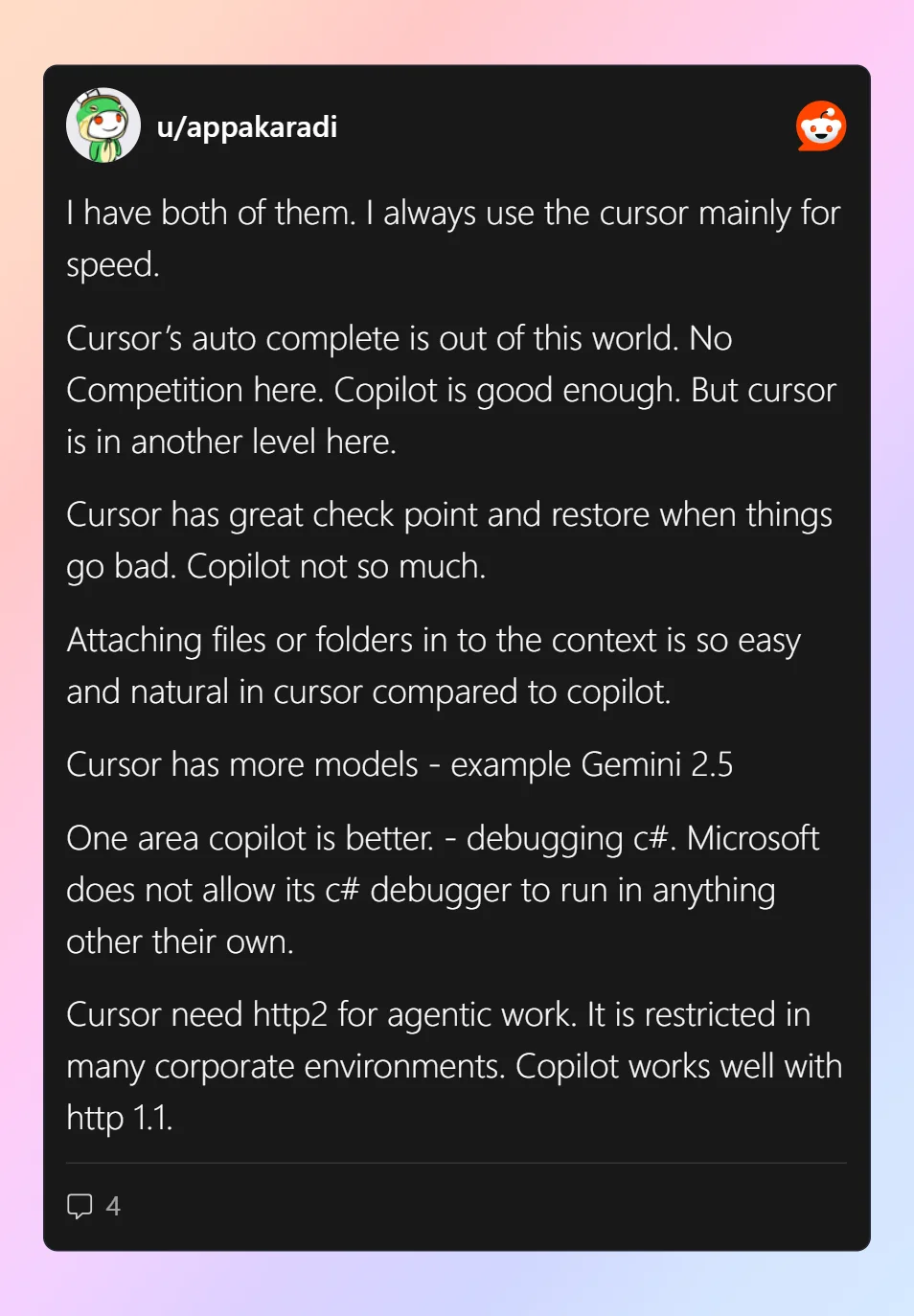
The Cursor vs Copilot debate is still active in developer communities. The pattern that keeps emerging in 2026 discussions:
Developers who primarily write new features in well-understood codebases tend to prefer Copilot's speed and lower cost. Developers who spend significant time debugging, onboarding onto new codebases, or doing large refactors tend to prefer Cursor's depth. Many teams use both — Copilot for day-to-day autocomplete, Cursor for specific complex tasks.
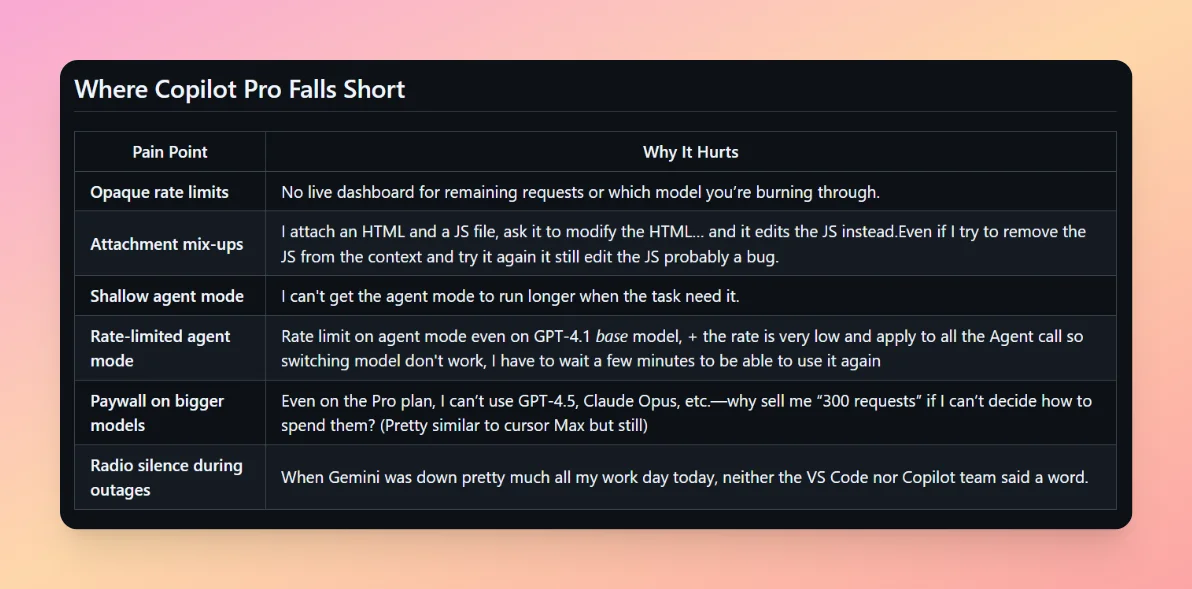
A consistent complaint about Cursor that appears in 2026 forums: the $40/user/month team pricing feels high for smaller teams that only occasionally need the deep codebase features.
Where Does Windsurf Fit In?
Windsurf (formerly Codeium) is now the third option worth considering seriously, especially for enterprise teams.
Windsurf added Cascade — its own agent mode — and offers features comparable to Cursor at a lower price point ($15/user/month on the Pro plan versus Cursor's $40/user/month). For teams that found Cursor's performance satisfactory but balked at the enterprise pricing, Windsurf has become a real alternative.
Windsurf also has stronger enterprise security controls and self-hosted deployment options, which matters for regulated industries.
Cursor vs Copilot vs Windsurf vs Claude Code
Tool | Best For | Model | Price |
|---|---|---|---|
GitHub Copilot | Fast autocomplete, JetBrains users | GPT-4o | $10-19/mo |
Cursor | Deep codebase work, agentic tasks | Claude/GPT-4o/Gemini | $20-40/mo |
Windsurf | Enterprise teams, cost-conscious orgs | Proprietary + Claude | Free-$15/mo |
Claude Code | Terminal-based agentic engineering | Claude Opus 4 | Usage-based |
Source: Official pricing and documentation, June 2026
Claude Code is worth understanding separately. It is a terminal-based coding agent, not an IDE. You use it for large-scale tasks — "refactor this entire module to TypeScript," "add comprehensive tests to all public functions" — that you want to delegate rather than execute interactively. Many developers use Claude Code for bulk tasks and Cursor for interactive development.
What About Non-Developers? Consider Dualite
For founders, designers, or product managers who want to build working software without writing code, neither Cursor nor Copilot is the right answer. Both require you to understand and write code. Dualite is built specifically for this use case — you describe what you want to build in plain language and get a working web app, mobile app, or dashboard back, with a real database and custom domain, no code required.
For developers building internal tools or prototyping quickly, Dualite also handles the scaffolding so you can focus on the parts that actually need your expertise.
Which Should You Choose?
Choose GitHub Copilot if:
You use JetBrains IDEs (only Copilot supports them properly)
Budget is a primary concern
You want AI assistance without changing your editor
Your team primarily writes new features in well-understood code
You want tight GitHub integration for PR reviews and issue tracking
Choose Cursor if:
You work on large, complex, or legacy codebases
Onboarding new engineers is a significant time cost for your team
You want to switch between AI models based on the task
Agent mode for multi-file tasks is important to your workflow
You are willing to pay more for deeper AI integration
Consider Windsurf if:
You want Cursor-level capabilities at a lower team price
You need enterprise security controls or self-hosted deployment
Your team tried Cursor but found the pricing hard to justify at scale
Conclusion
The cursor vs copilot debate in 2026 is more nuanced than it was a year ago. Both tools have gotten better. Copilot added meaningful agent capabilities. Cursor fixed its reliability issues. Windsurf arrived as a genuine third option.
For most individual developers choosing between the two: Copilot if you value price and IDE flexibility, Cursor if you value depth and model choice. For teams: run a two-week trial of both with a real project and measure the actual impact on the work that takes you the most time. That is more useful than any feature comparison.
Frequently Asked Questions
1. Is Cursor better than GitHub Copilot in 2026?
For most developers working on complex codebases, Cursor is the stronger tool in 2026. Its full codebase awareness, model switching, and more capable agent mode give it an edge over Copilot. However, Copilot remains better if you use JetBrains IDEs, have a limited budget, or want AI assistance without changing your editor. The right answer depends on your workflow.
2. What happened to Amazon CodeWhisperer?
Amazon discontinued CodeWhisperer as a standalone product in late 2025 and merged it into Amazon Q Developer. If you were using CodeWhisperer, Amazon Q Developer is the replacement. For developers not on AWS, this effectively removes CodeWhisperer from the comparison and makes Cursor, Copilot, and Windsurf the main options.
3. How does Copilot Workspace compare to Cursor Agent?
Copilot Workspace starts from a GitHub Issue and helps plan and implement the solution. Cursor Agent accepts freeform task descriptions and executes across your codebase. Workspace is tighter for teams using GitHub Issues as their primary task management. Cursor Agent is more flexible for tasks that do not start from a GitHub Issue. Both execute multi-file changes, but Cursor Agent is generally more capable at complex, open-ended tasks.
4. Can I use both Cursor and GitHub Copilot?
Yes, and many developers do. A common pattern is using Copilot for day-to-day autocomplete in VS Code and switching to Cursor when working on complex refactoring or debugging sessions. The tools complement each other more than they compete for exactly the same use case.
5. Is Windsurf worth considering over Cursor?
Yes, particularly for enterprise teams and budget-conscious organizations. Windsurf's Pro plan at $15/user/month is significantly cheaper than Cursor's $40/user/month business tier. Its Cascade agent mode is comparable to Cursor Agent for most tasks. If you are evaluating tools for a team of 10+ people, Windsurf is worth a serious trial alongside Cursor.
6. Does Cursor work with JetBrains IDEs?
No. Cursor is a standalone application and does not work as a plugin inside JetBrains environments (WebStorm, IntelliJ, PyCharm, etc.). If your team uses JetBrains, GitHub Copilot is currently the strongest AI coding assistant with proper JetBrains support.
7. What is Claude Code and how does it relate to Cursor?
Claude Code is a terminal-based coding agent from Anthropic, not an IDE. You use it by running commands in your terminal to give Claude Opus 4 tasks to execute across your codebase. It is not a replacement for Cursor or Copilot but a complementary tool for bulk tasks. Many developers use Claude Code for large refactors and Cursor for interactive day-to-day development.
8. Which tool is better for teams and enterprises?
For small to medium teams, Cursor is generally the stronger choice if budget is not the primary concern. For larger enterprises with JetBrains users, GitHub Copilot's enterprise plan with its IDE flexibility and Microsoft/GitHub ecosystem integration is often the practical choice. Windsurf is worth evaluating for enterprises that want Cursor-level features with stronger security controls at a lower price.
9. How much does Cursor cost compared to Copilot in 2026?
Cursor Individual costs $20/month versus Copilot's $10/month. For teams, Cursor Business is $40/user/month versus Copilot Business at $19/user/month. Over a year for a 10-person team, the difference is roughly $2,500. Whether that premium is worth it depends on how much your team's productivity is impacted by the features Cursor offers that Copilot does not.
10. Is there a free version of Cursor or Copilot?
Cursor has a free tier with limited AI usage that lets you try the product. GitHub Copilot does not have a free tier for general users — it is free only for verified students, educators, and maintainers of popular open-source projects. Windsurf has a free tier with reasonable limits that is more generous than Cursor's for getting started.
11. What is the best AI coding tool for beginners?
For beginners who want to write code with AI assistance, Cursor is the better learning tool — its codebase chat lets you ask questions about your own code, which accelerates understanding. For complete beginners who want to build something without writing code at all, Dualite is the lowest-friction path from idea to working product.
12. Will Cursor or Copilot replace developers?
Neither. Both tools make existing developers more productive, but the job of understanding requirements, making architectural decisions, reviewing AI output, and ensuring quality still requires human judgment. The developers who adopt these tools are significantly more productive than those who do not, which is changing team size requirements but not eliminating the need for developers.
Related: Best AI Coding Tools in 2026 - Best AI Models for Coding (2026) - AI Assisted Programming: A Complete Guide